Browser UI
The Browser UI is a predefined layout that offers you the complete CMP functionality in conjunction with ready to use UI which can be customized from the Admin interface.
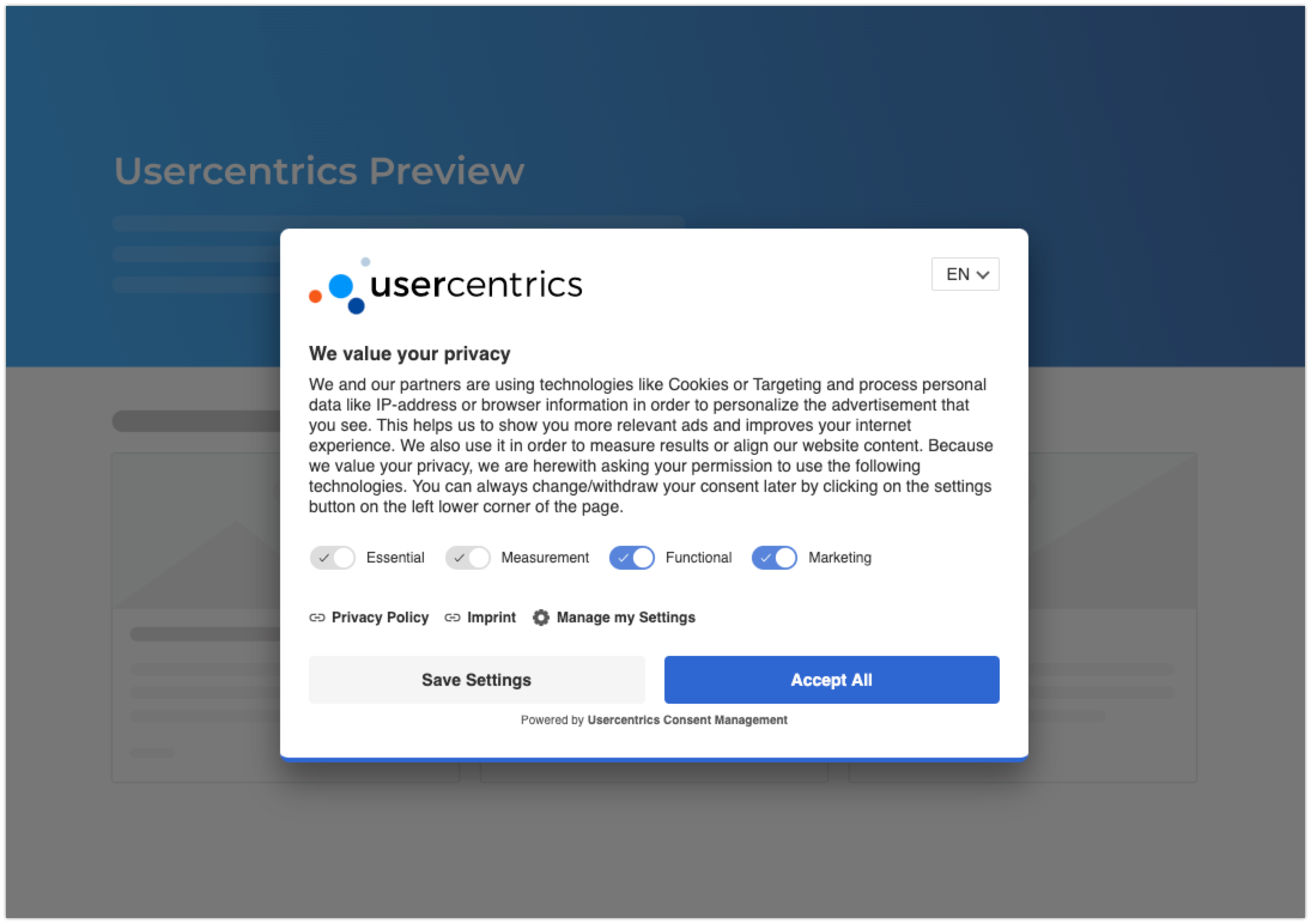
Features
Getting Started
Step 1 - Data Processing Services (DPS)
On the Admin Interface under Service Settings -> Data Processing Services please add the Data Processing Services (DPS) that you would like to add to your configuration.
Please note that the following Google services that support Google Consent Mode are available here.
Implementation
Step 1 - Integrate the JavaScript Tag
To execute your scripts only after your visitors have given their consent, you must first integrate the Usercentrics script into in the head area of your website. Find your personal script with your Settings-ID in the Admin Interface Implementation section.
- Non-TCF Script:
<script id="usercentrics-cmp" data-settings-id="XXXXXXXX" src="https://app.usercentrics.eu/browser-ui/latest/loader.js" async></script> - TCF Script:
<script id="usercentrics-cmp" data-settings-id="XXXXXXXX" src="https://app.usercentrics.eu/browser-ui/latest/loader.js" data-tcf-enabled></script>
For customers using the Google Tag Manager, it is also possible to implement the JavaScript tag via our template. * Guide for implementing Usercentrics CMP via Google Tag Manager template
-
Geolocation Script:
In order to provide geolocation feature we introduced a Ruleset ID property which will point to an existing geolocation config settingsIds mapping.
This will allow you to get a banner based on your specific rules, having different banners in different locations.
You can integrate the Usercentrics script tag usingruleset-idinstead ofdata-settings-id.
<script id="usercentrics-cmp" ruleset-id="XXXXXXXX" src="https://app.usercentrics.eu/browser-ui/latest/loader.js"></script> -
Draft Script:
To test new changes within the Admin Interface before releasing them to your live environment, you can save any changes to a draft version. To display this draft version, you will need to add a data-version="preview" attribute to the CMP script tag.
Note: To prevent any interaction analytics data from being collected in the draft version, you can add the additional attribute data-disable-tracking to the script tag.<script id="usercentrics-cmp" src="https://app.usercentrics.eu/browser-ui/latest/loader.js" data-version="preview" data-disable-tracking data-settings-id="WeohTvPpy" async></script>
Step 2 - Adjust your implemented Scripts
After integrating the JavaScript tag, the integrated scripts (Data Processing Services) have to be added to your configuration and adjusted on your website or tag manager. * [Guide for scripts that are directly integrated into your website]//(direct-implementation-guide.md) * Guide for scripts that are integrated via Google Tag Manager
In case you have technologies implemented on your website which are not directly implemented as scripts (e.g. Iframes, noscript tags, image tags), make sure these are also blocked until consent is given by the user. For many of these cases you can use our [Smart Data Protector]//(smart-data-protector.md) for specific supported technologies or build the blocking yourself with our API. In case you have technologies implemented on your website which are not directly implemented as scripts (e.g. Iframes, noscript tags, image tags), make sure these are also blocked until consent is given by the user. For many of these cases you can use our [Smart Data Protector]//(smart-data-protector.md) for specific supported technologies or build the blocking yourself with our API.
Further Implementation Guides
In addition to the above mentioned implementation, we procide further implementation guides for third party tools and tag managers. These implementation guides include both steps, meaning 1. Integrating the JavaScript Tag and 2. Adjusting the implemented scripts of the used Data Processing Services. * Guide for Adobe Launch Integration * Guide for econda Configuration (German Version) * [Guide for Mapp Intelligence Configuration]//(v2-mapp-intelligence-configuration.md) * [Guide for Mapp Intelligence Configuration]//(v2-mapp-intelligence-configuration.md) * Guide for Oxid Integration * Guide for Tealium iQ Tag Management Integration * Guide for etracker Configuration(German Version)
Optional Steps
Adding a nonce to the script tag
To add a nonce to your personal script, you can add it like so:
- Non-TCF Script:
<script id="usercentrics-cmp" nonce="nonce-VALUE" data-settings-id="XXXXXXXX" src="https://app.usercentrics.eu/browser-ui/latest/loader.js" async></script> - TCF Script:
<script id="usercentrics-cmp" nonce="nonce-VALUE" data-settings-id="XXXXXXXX" src="https://app.usercentrics.eu/browser-ui/latest/loader.js" data-tcf-enabled></script>
Improved consent sharing between subdomains
If you're using Usercentrics Cross Domain Consent Sharing (CDCS) your website visitors might still see the CMP again when switching to another subdomain, for example mywebshop.com to checkout.mywebshop.com. Modern browsers are causing this behavior as they block the shared iframe provided by Usercentrics. The following section describes the needed steps to prevent this from happening.
!> This solution will improve user experience for most browsers, however currently we have some browser related restrictions: CDCS does not work without sharing 3rd-Party local storage information across different browser tabs or if the user enabled special privacy settings within the Browser settings.
Safari: CDCS does not work with Safari, since the browser does not share 3rd-Party local storage across different browser tabs. Due to this restriction, the feature can not share the iFrame's local storage across different tabs
Firefox: If the option "Delete Cookies" is enabled, the feature does not work, since Firefox clears the local storage for every new tab automatically, which prevents saving consents.
Chrome: From Chrome version 115 and going forward, CDCS does not work between different root domains (ex. a.com → b.com) because of restrictions that Google have imposed on third-party storage possibilites. This means, that our current implementation of CDCS now effectively only works between root domains and their subdomains (ex. sub.a.com → a.com → othersub.a.com). Read more about the updates that Google have made to Chrome here.
- Download the file cross-domain-bridge.html (right click > save as ...)
- Upload this file to your webserver. It should be reachable from your main domain that is included in all of your subdomains. For example:
https://mywebshop.com/cross-domain-bridge.html - Before the Usercentrics CMP script tag, set the new location of the Cross Domain Bridge via the
window.UC_UI_DOMAINS.crossDomainConsentSharingIFrameproperty (this should be added into all the domains, including the main domain).
A complete example might look like this:
<html>
<head>
<script>
    window.UC_UI_DOMAINS = {
        crossDomainConsentSharingIFrame: 'https://mywebshop.com/cross-domain-bridge.html',
    };
</script>
<script id="usercentrics-cmp" data-settings-id="XXXXXXXX" src="https://app.usercentrics.eu/browser-ui/latest/loader.js" async></script>
</head>
<body>
</body>
</html>
White labeling URLs
For customers that only allow sources from the same domain on their websites for security reasons, you can now configure from which address all Usercentrics resources (JSON files, JavaScript files etc.) should be loaded. Important: This should be configured before the UI script from Step 1
In order to configure the domains please define the window variable called UC_UI_DOMAINS with the following structure:
window.UC_UI_DOMAINS = {
    aggregator: '',
    app: '',
    cdn: '',
    consents: '',
    consentsV2: '',
    crossDomainConsentSharingIFrame: '',
    graphql: '',
    trackingEvent: ''
};
Our Endpoints Important: Your proxy servers should point to the following domains Note: Regarding Cross Domain Consent Sharing feature you can white label only the domain via app key or provide a full URL to be used for this feature via crossDomainConsentSharingIFrame key
| Name | Purpose | Key | Domain |
|---|---|---|---|
| Aggregator | Get all the services and their details | aggregator | https://aggregator.service.usercentrics.eu |
| App | Enable some UC features (ex. Cross Domain Consent Sharing) | app | https://app.usercentrics.eu |
| CDN | UC content delivery server (settings information, translations, etc.) | cdn | https://api.usercentrics.eu |
| Consents | Get the consents data for Cross Domain feature | consents | https://consents.usercentrics.eu |
| Consents V2 | Get the consents data for Cross Domain feature - new version | consentsV2 | https://consent-api.service.consent.usercentrics.eu |
| GraphQL | Stores all user decisions on server | graphql | https://graphql.usercentrics.eu |
| Tracking Event | Tracking Pixel feature | trackingEvent | https://uct.service.usercentrics.eu |
| CDCS IFrame | URL used on Cross Domain Consent Sharing Iframe to get data | crossDomainConsentSharingIframe | https://app.usercentrics.eu/browser-sdk/BROWSER_SDK_VERSION/cross-domain-bridge.html |