Custom CSS for Browser UI
In this documentation, we will provide all information regarding Custom CSS in the CMP v2, including the customizable classes and specific cases.
Please note, that only Custom CSS for classes provided in this documentaion which was added in the Admin Interface under Appearance / Styling will be applied to the CMP.
⚠️ Important: By using Custom CSS, you will be in control of your custom UI. Please be aware that your CSS adjustments will affect the layout of your CMP and possibly also of your website. You'll make these adjustments at your own risk and outside of the sphere of the Usercentrics support.
⚠️ Important: Currently there is no support for CSS Selectors (> div, *, etc.) on the CustomCSS feature, the classes present in this document are the only ones currently available for use. Using, for example,
.uc-layer > divwill have no effect.
All Device Classes
These are the editable CSS classes that we offer for the basic cases. We also share the properties that are possible to change for each class.
All values written for these properties are just examples.
CMP Wrapper
The wrapper that containts the entire CMP for Wall content.
.uc-layer {
  display: flex;
  flex-direction: column;
  box-shadow: 10px 5px 5px red;
  border: 10px solid #000;
  height: 80%;
  margin: 50px auto 0;
  padding: 30px;
  width: 60%;
  max-width: 50%;
  min-height: 0px;
}
min-height, flex-direction, and box-shadow as initial if you desire For the Wall content, there's also the possibility of providing specific CustomCSS for the Second Layer, if none is given and only the .uc-layer is given, it will be applied to both layers (First and Second)
.uc-second-layer {
  display: flex;
  flex-direction: column;
  box-shadow: 10px 5px 5px red;
  border: 10px solid #00F;
  height: 80%;
  margin: 50px auto 0;
  padding: 30px;
  width: 60%;
  max-width: 50%;
  min-height: 0px;
  border-top-left-radius: 16px;
  border-top-right-radius: 16px;
  border-bottom-left-radius: 16px;
  border-bottom-right-radius: 16px;
}
The wrapper that containts the entire CMP for Banner content.
.uc-banner-content {
  border: 10px solid #000;
  height: 80%;
  margin: 50px auto 0;
  max-height: 50%;
  max-width: 50%;
  padding: 30px;
  width: 60%;
}
Accepted Properties
For this CSS Selector, the list below provides the accepted properties
For the properties represented with a (*), all the possible properties are also accepted (eg.
font(*)accepts all font properties, for example font-family, font-size, etc.)
.uc-layer and .uc-second-layer * display * flex-direction * box-shadow * border() * height * margin() * max-width * padding(*) * width * min-height
.uc-banner-content * border() * height * margin() * max-width * padding(*) * width * max-height
Powered By Link
"Powered by" link
.uc-powered-by {
  display: flex;
  border: none;
  height: 100%;
  margin: 0px;
  max-width: 150px;
  padding: 0px;
  width: 100%;
  min-height: 42px;
  flex-direction: row;
  text-decoration: underline;
}
Accepted Properties
For this CSS Selector, the list below provides the accepted properties
For the properties represented with a (*), all the possible properties are also accepted (eg.
font(*)accepts all font properties, for example font-family, font-size, etc.)
- display
- border
- height
- margin
- max-width
- padding
- width
- min-height
- flex-direction
- text-decoration
Banner Message
Banner Message of your Privacy Banner.
.uc-message {
  color: purple;
  font-weight: bold;
  font-family: "Times New Roman", Times, serif;
}
Accepted Properties
For this CSS Selector, the list below provides the accepted properties
For the properties represented with a (*), all the possible properties are also accepted (eg.
font(*)accepts all font properties, for example font-family, font-size, etc.)
- color
- font(*)
- text(*)
Banner Title Container
Container for the Privacy Banner Title.
.uc-title-container {
  width: 90%;
}
Accepted Properties
For this CSS Selector, the list below provides the accepted properties
For the properties represented with a (*), all the possible properties are also accepted (eg.
font(*)accepts all font properties, for example font-family, font-size, etc.)
- width
Banner Title
Title for the Privacy Banner.
.uc-title {
  color: red;
  font-family: arial;
  text-align: center;
  font-size: 10px;
  font-weight: 100;
  line-height: 15px;
}
Accepted Properties
For this CSS Selector, the list below provides the accepted properties
For the properties represented with a (*), all the possible properties are also accepted (eg.
font(*)accepts all font properties, for example font-family, font-size, etc.)
- color
- font(*)
- line-height
- text(*)
Buttons Container
The buttons container of the CMP (Accept all / Deny All / More Information / Save).
.uc-buttons-container {
  flex-direction: row-reverse;
  width: 100%;
  justify-content: center;
  align-items: center;
  padding: 0px;
  column-gap: 0px;
  row-gap: 0px;
  margin: 0px;
}
Accepted Properties
For this CSS Selector, the list below provides the accepted properties
For the properties represented with a (*), all the possible properties are also accepted (eg.
font(*)accepts all font properties, for example font-family, font-size, etc.)
- flex(*)
- width
- justify-content
- align-items
- padding
- column-gap
- row-gap
- margin(*)
Buttons Container Wrapper
The buttons container wrapper of the CMP
.uc-buttons-container-wrapper {
  flex: 1;
  width: 100%;
  justify-content: center;
  align-items: center;
  padding: 0;
  column-gap: 0;
  row-gap: 0;
  margin: 0;
}
Accepted Properties
For this CSS Selector, the list below provides the accepted properties
For the properties represented with a (*), all the possible properties are also accepted (eg.
font(*)accepts all font properties, for example font-family, font-size, etc.)
- flex(*)
- width
- justify-content
- align-items
- padding(*)
- column-gap
- row-gap
- margin(*)
Buttons
Buttons of the CMP (Accept all / Deny All / More Information / Save).
.uc-action-button {
  border: 2px dashed #ccc;
  font-size: 14px;
  font-weight: normal;
  height: 30px;
  margin: 0 10px;
  padding: 2px;
  width: auto;
  display: flex;
  background: black,
  color: white;
  border: none;
  background-color: #1654b9;
}
Accepted Properties
For this CSS Selector, the list below provides the accepted properties
For the properties represented with a (*), all the possible properties are also accepted (eg.
font(*)accepts all font properties, for example font-family, font-size, etc.)
- border(*)
- font(*)
- height
- margin(*)
- padding(*)
- width
- flex(*)
- display
- background(*)
- color
- border(*)
- background-color
All the above properties will also be available for the specific button classes (.uc-accept-all-button, .uc-deny-all-button, .uc-more-button, and .uc-save-button).
Buttons Order
CMP buttons can be ordered in a desired way.
- horizontal → right to left (i.e. "1" is on the right and "4" on the left)
- vertical → top to bottom (i.e. "1" is on the top and "4" on the bottom) Attention: Our CMP is WCAG 2.1 compliant. However, if the order of buttons is changed via Custom CSS we do not guarantee full compliance.
TCF: For TCF, instead of using the .uc-more-button class, please use the .uc-customize-button class instead.
.uc-accept-all-button {
  order: 1;
}

.uc-deny-all-button {
  order: 4;
}

.uc-more-button {
  order: 3;
}

// Only for TCF (replaces the uc-more-button)
.uc-customize-button {
  order: 3;
}

.uc-save-button {
  order: 2;
}
Specific Buttons
The following classes can be used to customise a specific button .uc-accept-all-button, .uc-deny-all-button, .uc-more-button, .uc-save-button
Accepted Properties
For these CSS Selectors, the list below provides the accepted properties
For the properties represented with a (*), all the possible properties are also accepted (eg.
font(*)accepts all font properties, for example font-family, font-size, etc.)
- order
- flex(*)
- height
- margin(*)
- padding(*)
- width
- border(*)
- display
- background(*)
- color
Category / Purpose and Services / Vendors Wrapper
The wrapper that contains the Vendors / Services / Categories / Purposes list.
.uc-tab-content {
  background: #ccc;
  color: red;
  margin: 20px;
  padding: 0 30px;
}
Accepted Properties
For this CSS Selector, the list below provides the accepted properties
For the properties represented with a (*), all the possible properties are also accepted (eg.
font(*)accepts all font properties, for example font-family, font-size, etc.)
- background(*)
- color
- margin(*)
- padding(*)
Language Switch
Language switch menu on the first and second layer.
.uc-language-switch {
  background: green;
  color: #fff;
  font-size: 14px;
}
Accepted Properties
For this CSS Selector, the list below provides the accepted properties
For the properties represented with a (*), all the possible properties are also accepted (eg.
font(*)accepts all font properties, for example font-family, font-size, etc.)
- background(*)
- color
- font-size
Links
Adjust the links to the privacy policy / legal notice on your first layer.
.uc-links {
  font-size: 16px;
  text-decoration: underline;
  font-weight: 100;
  line-height: 15px;
}
Accepted Properties
For this CSS Selector, the list below provides the accepted properties
For the properties represented with a (*), all the possible properties are also accepted (eg.
font(*)accepts all font properties, for example font-family, font-size, etc.)
- font(*)
- line-height
- text(*)
Logo
Adjust the height and width of your logo.
.uc-logo {
  height: 20px;
  width: 100px
}
Accepted Properties
For this CSS Selector, the list below provides the accepted properties
For the properties represented with a (*), all the possible properties are also accepted (eg.
font(*)accepts all font properties, for example font-family, font-size, etc.)
- height
- width
Tab Buttons Container
Adjust the container for the Tab Buttons
.uc-tab-buttons-container {
  display: flex;
  width: 50%;
  justify-content: center;
  align-items: center;
  margin: 0px;
  padding: 10px;
}
Accepted Properties
For this CSS Selector, the list below provides the accepted properties
For the properties represented with a (*), all the possible properties are also accepted (eg.
font(*)accepts all font properties, for example font-family, font-size, etc.)
- display
- width
- justify-content
- align-items
- margin(*)
- padding(*)
Tab Buttons
The tab buttons for Categories and Services (Purposes and Vendors in TCF2.2).
.uc-tab-button {
  background: #ccc;
  font: arial;
  height: 30px;
  margin: 5px;
  padding: 10px;
  width: 100px;
  font-size: 10px;
  font-weight: 100;
  line-height: 15px;
}
The active(selected) tab button for Categories and Services (Purposes and Vendors in TCF2.2).
.uc-tab-button-active {
  background: #00f;
  font: arial;
  height: 35px;
  margin: 5px;
  padding: 10px;
  width: 100px;
  font-size: 15px;
  font-weight: 100;
  line-height: 15px;
  border-bottom: 2px solid #00f;
}
Accepted Properties
For this CSS Selector, the list below provides the accepted properties
For the properties represented with a (*), all the possible properties are also accepted (eg.
font(*)accepts all font properties, for example font-family, font-size, etc.)
.uc-tab-button and .uc-tab-button-active * background() * font() * height * line-height * margin() * padding() * text(*) * width * border-bottom (only available for .uc-tab-button-active)
Cards
The cards for Categories and Services (Purposes and Vendors in TCF2.2).
.uc-card-title {
  font-size: 20px;
  font-weight: 300;
  line-height: 15px;
}
.uc-card-description {
  font-size: 15px;
  font-weight: 100;
  line-height: 15px;
}
Accepted Properties
For this CSS Selector, the list below provides the accepted properties
For the properties represented with a (*), all the possible properties are also accepted (eg.
font(*)accepts all font properties, for example font-family, font-size, etc.)
.uc-card-title and .uc-card-description * font-size * font-weight * line-height
Privacy Button
.uc-privacy-button {
  left: 0px;
  bottom: 0px;
  width: 42px;
  height: 42px;
}
Accepted Properties
For this CSS Selector, the list below provides the accepted properties
For the properties represented with a (*), all the possible properties are also accepted (eg.
font(*)accepts all font properties, for example font-family, font-size, etc.)
.uc-privacy-button * left * right * bottom * width * height
Card for ID to request consent data
.uc-controller-id {
  background-color: green;
  color: white;
  border-color: purple;
}
Accepted Properties
For this CSS Selector, the list below provides the accepted properties
.uc-controller-id * background-color * color * border-color
Third Countries Data Transfer Filter
.uc-third-country-data-transfer-filter {
  border-color: red;
  border-radius: 0;
  color: red;
  background-color: white;
}
Accepted Properties
For this CSS Selector, the list below provides the accepted properties
.uc-third-country-data-transfer-filter * border-color * border-radius * color * background-color
Footer Wrapper
The wrapper of the Footer
.uc-footer-wrapper {
  border: none;
  padding: 0;
  flex: 1;
}
Accepted Properties
For this CSS Selector, the list below provides the accepted properties
For the properties represented with a (*), all the possible properties are also accepted (eg.
font(*)accepts all font properties, for example font-family, font-size, etc.)
- border(*)
- padding(*)
- flex(*)
Footer Content (Banner specific)
The content of the Footer (only available when in Banner presentation)
.uc-footer-content {
  flex: 1;
  padding: 0;
  margin: 0;
  border: none;
  justify-content: center;
  align-items: center;
  width: 100%;
  height: 100%;
  display: flex;
  flex-direction: column-reverse;
}
Accepted Properties
For this CSS Selector, the list below provides the accepted properties
For the properties represented with a (*), all the possible properties are also accepted (eg.
font(*)accepts all font properties, for example font-family, font-size, etc.)
- flex(*)
- padding(*)
- margin(*)
- border(*)
- justify-content
- align-items
- width
- height
- display
Case-Specific Classes
We also offer the possibility to change the CSS only for specific cases, by adding __CASE in front of the mentioned all device classes. All the properties associated with the classes mentioned before also apply to these case-specific classes.
Desktop-Specific Classes
For desktop-specific classes, where the width (in portrait) or where the height (in landscape) are equal or higher than 768px, just add __desktop to any of the all device classes. For example:
.uc-action-button__desktop {
  border: 2px dashed #ccc
}
Internet Explorer 11 Classes
For IE11-specific classes, just add __ie to any of the all device classes. For example:
.uc-tab-content__ie {
  background-color: #ccc;
}
Landscape-Specific Classes
For landscape-specific classes, just add __landscape to any of the all device classes. For example:
.uc-tab-content__landscape {
  background-color: #ccc;
}
Portrait-Specific Classes
For portrait-specific classes, just add __portrait to any of the all device classes. For example:
.uc-tab-content__portrait {
  background-color: #ccc;
}
Mobile-Specific Classes
For mobile-specific classes, where the width (portrait) and the height (landscape) is smaller than 768px and equal or higher than 600px, just add __mobile to any of the all device classes. For example:
.uc-tab-content__mobile {
  background-color: #ccc;
}

.uc-buttons-container__mobile {
  flex-direction: row;
  flex-wrap: wrap;
  column-gap: 16px;
  row-gap: 8px;
}

.uc-action-button__mobile {
  display: inline-block;
  flex: initial;
  width: auto;
  padding: 10px 24px;
  font-weight: normal;
  flex: 1;
}
Small Mobile-Specific Classes
For small mobile-specific classes, where the width (portrait) and the height (landscape) is smaller than 600px and equal or higher than 400px, just add __mobileSmall to any of the all device classes. For example:
.uc-tab-content__mobileSmall {
  background-color: #ccc;
}
Extra Small Mobile-Specific Classes
For extra small mobile-specific classes, where the width (portrait) and the height (landscape) is smaller than 400px, just add __mobileExtraSmall to any of the all device classes. For example:
.uc-tab-content__mobileExtraSmall {
  background-color: #ccc;
}
Hover-Specific Classes
It is also possible to define the Hover Style for specific classes. For example:
.uc-action-button__hover {
  background-color: #491442;
}

.uc-save-button__hover {
  background-color: #d2d7db;
}
Example of Custom CSS
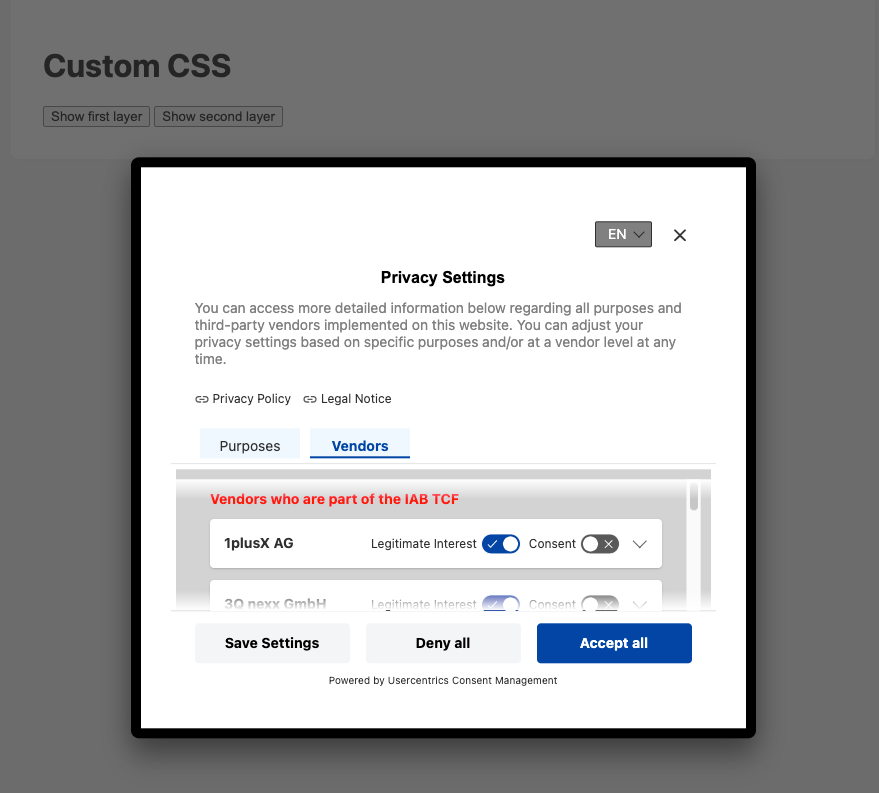
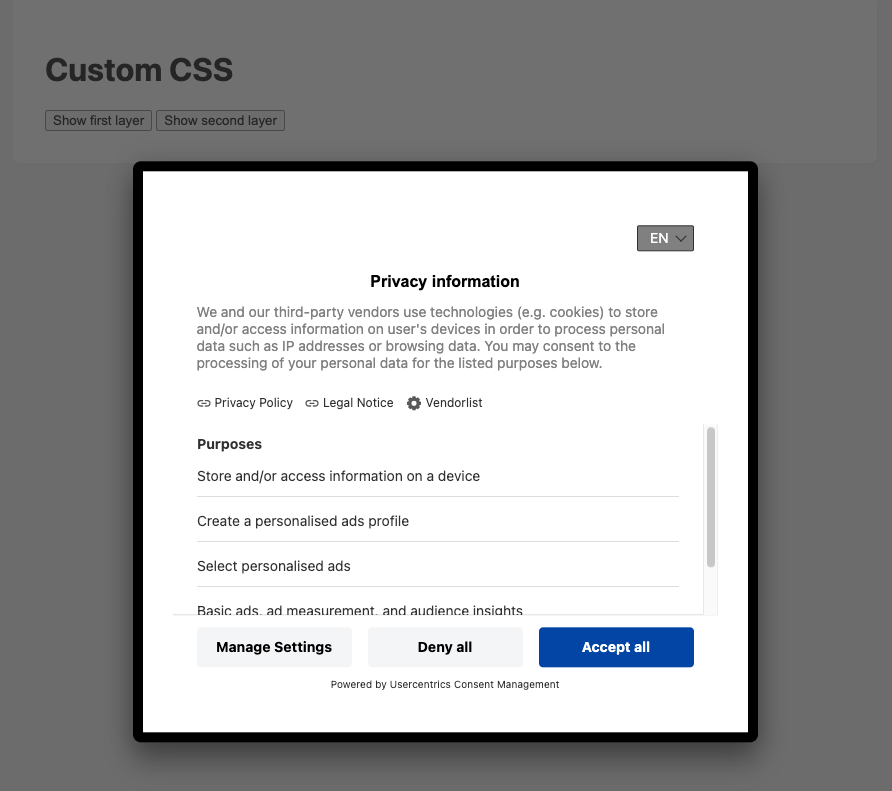
In this example we tested most possible changes to show you what you can do with Custom CSS in the CMP v2.
Example Code
  .uc-action-button {
    border: 2px dashed #ccc;
    font-size: 14px;
    font-weight: normal;
    height: 10px;
    margin: 0 10px;
    padding: 2px;
    width: auto;
  }
  .uc-message {
    color: gray;
    font-weight: 0;
  }
  .uc-language-switch {
    background: gray;
    color: #fff;
    font-size: 14px;
  }
  .uc-layer {
    border: 10px solid #000;
    height: 60%;
    margin: 50px auto 0;
    padding: 30px;
    width: 100%;
    max-width: 50%;
    min-height: 0px;
  }
  .uc-tab-button {
   background: #ccc;
   font: arial;
   height: 30px;
   margin: 5px;
   padding: 10px;
   width: 100px;
  }
  .uc-tab-button-active {
    background: #00f;
    font: arial;
    height: 35px;
    margin: 5px;
    padding: 10px;
    width: 100px;
    font-size: 15px;
    font-weight: 100;
    line-height: 15px;
  }
  .uc-tab-content {
    background: lightgray;
    color: red;
    margin: 5px;
    padding: 10px;
  }
  .uc-title {
    color: black;
    font-family: arial;
    text-align: center;
  }
  .uc-card-title {
    font-size: 20px;
    font-weight: 300;
    line-height: 15px;
  }
  .uc-card-description {
    font-size: 15px;
    font-weight: 100;
    line-height: 15px;
  }
  .uc-links {
    font-size: 16px;
    text-decoration: underline;
    font-weight: 100;
    line-height: 15px;
  }
Outcome
First Layer
Second Layer