Privacy Policy Embeddings
Integrate our Data Processing Services directly into your website, e.g. your privacy policy.
Introduction
Design your privacy policy page with our embeddings so you don't have to maintain the difference between your privacy policy and your CMP. Keep your legally required information easily up to date, instead of extracting the information from our CMP and manually integrate it into your privacy policy page.
We provide an Embedding for all your services with customization options to only display the required information.
Embedding Data Processing Services
Offers to embed Data Processing Services on a custom level of information.
Embed all Data Processing Service with full information
<div class="uc-embed" uc-data="all"></div>
Embed a single Data Processing Service with full information
// e.g. Embedding for Facebook Connect
<div class="uc-embed" uc-consent-name="Facebook Connect" uc-data="all"></div>
Embed a single Data Processing Service with selected information
// e.g. Embedding for Facebook Connect
<div class="uc-embed" uc-consent-name="Facebook Connect" uc-data="all"></div>
Embed a single Data Processing Service with selected information
// e.g. Embedding for Google Tag Manager with name, description and data Purposes
<div class="uc-embed" uc-layout="serviceDetails" uc-consent-name="Google Tag Manager" uc-data="processorNames, description, dataPurposes"></div>
Optional attributes for controlling the information level uc-data: String with optional content, e.g. uc-data="processorNames, description, dataPurposes, ..."
- optInCheckboxWithLabel: Name of the Data Processing Service including a checkbox for consenting or denying the service.
- processorNames: Name of the data processor as well as its address.
- description: Description of the Data Processing Service. If you have changed the description in the settings manually, the adjusted text will be displayed.
- dataPurposes: List of the data processing purposes.
- technologiesUsed: List of the used technologies.
- dataCollected: List of the collected data.
- legalBasis: Legal basis, the data processing purpose is based on.
- retentionPeriod: Retention period of the processed data.
- dataRecipients: Further companies, which receive the processed data.
- thirdCountryTransfer: List of all countries, in which the processed data is saved.
- dataProtectionOfficer: E-Mail address of the data protection officer of the data processing service.
- furtherInformation: Additional information: opt-out link, opt-out description, privacy policy link, cookie policy link, link to the order processing contract, cookie storage information.
- processingLocation: Location where data is processed.
- all: Use this attribute only to show all the mentioned information above of the data processing service.
Embed types and UC Styling Choose whether to embed Data Processing Services grouped by Category, and wheter to set predefined styling of the embed list
Attribute name: uc-embedding-type Possible values: "all", "category", "category-only Default value: "all"
Attribute name: uc-styling Default value: "false"
Type all:
| uc-embedding-type="all"uc-styling="true" | uc-embedding-type="all"uc-styling="false" |
|---|---|
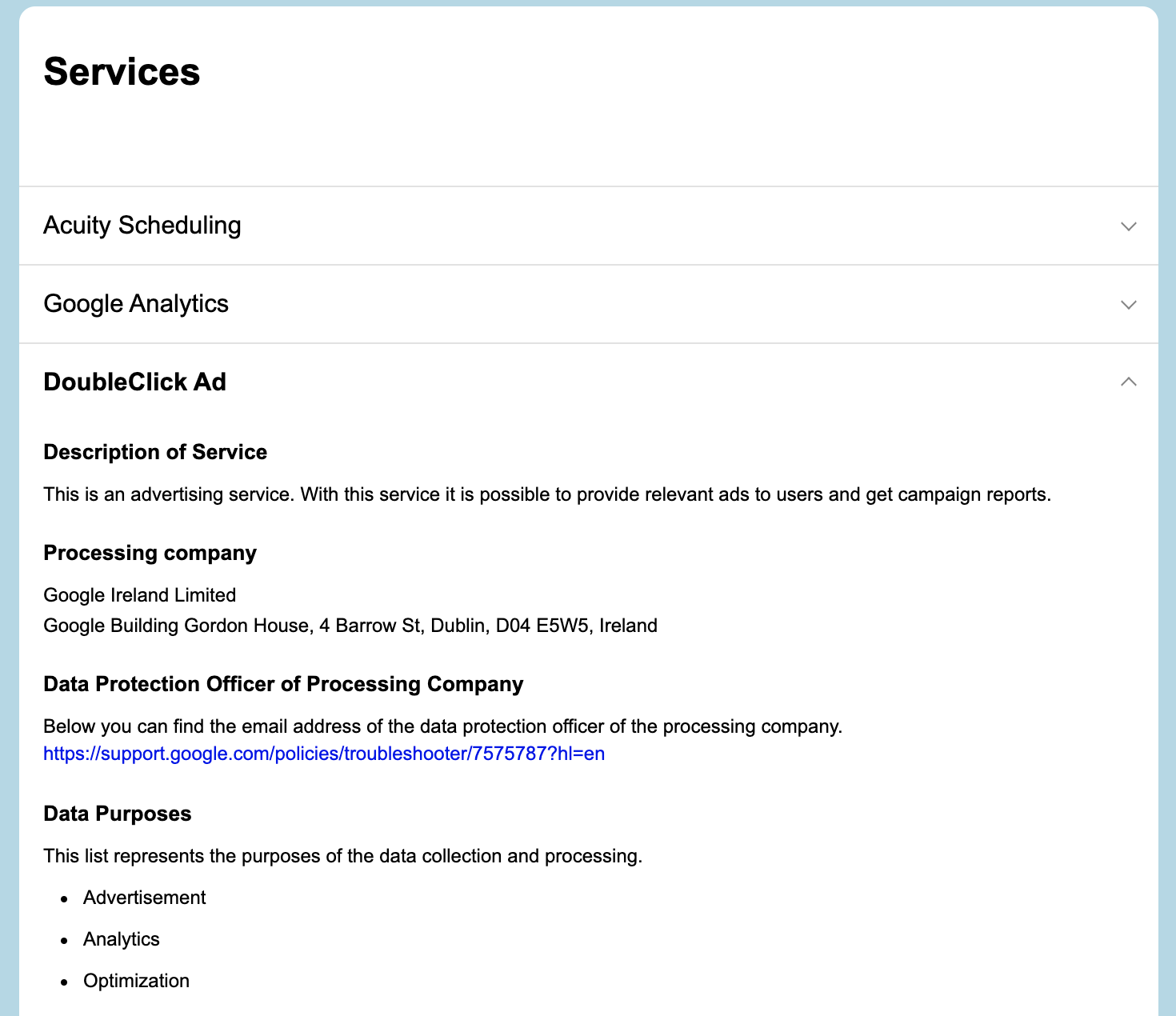 | 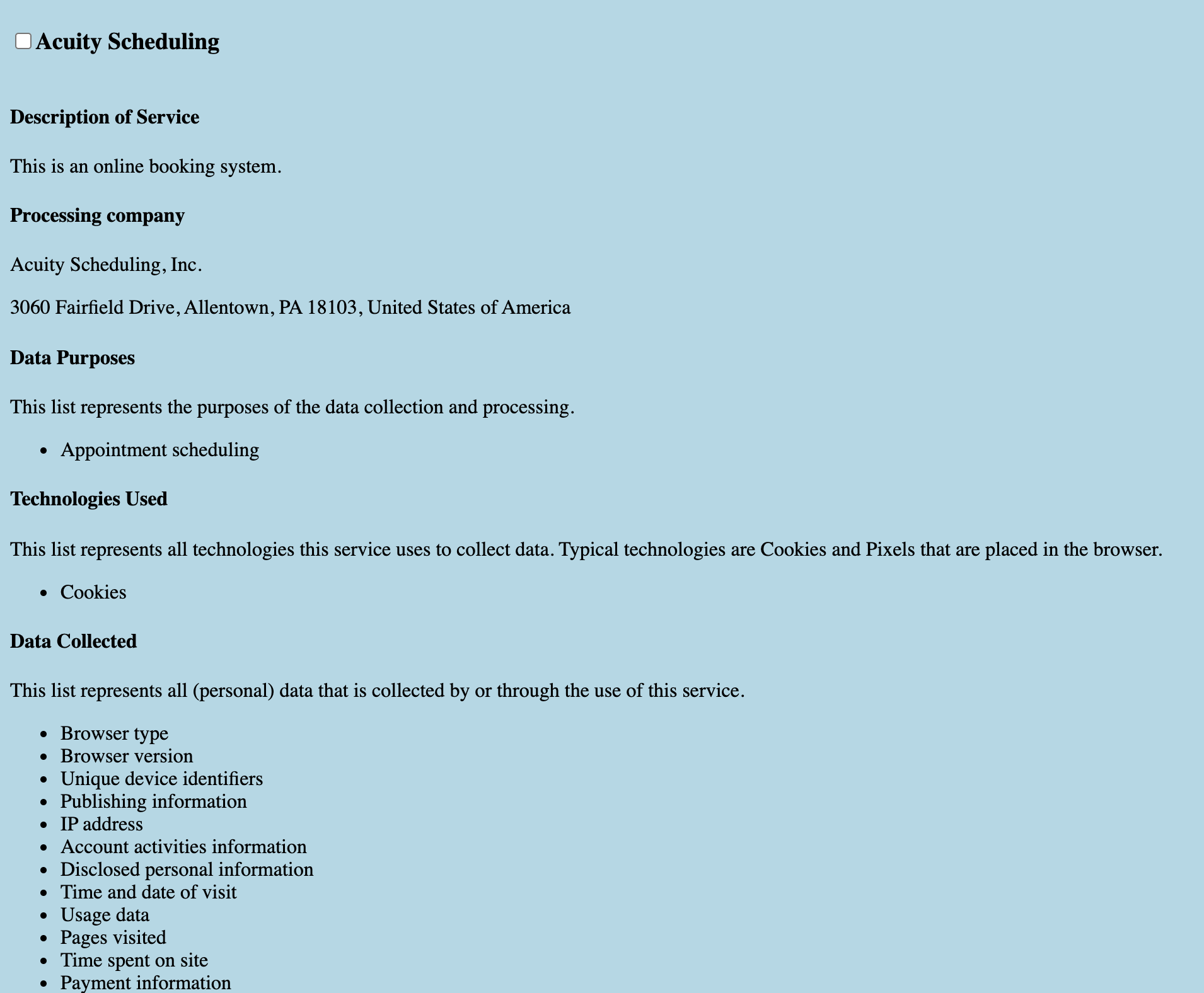 |
| There is a specific style applied to all elements in the list, which also includes a collapsable logic for the list items | No style is applied to the HTML Elements |
Type category:
| uc-embedding-type="category"uc-styling="true" | uc-embedding-type="category"uc-styling="false" |
|---|---|
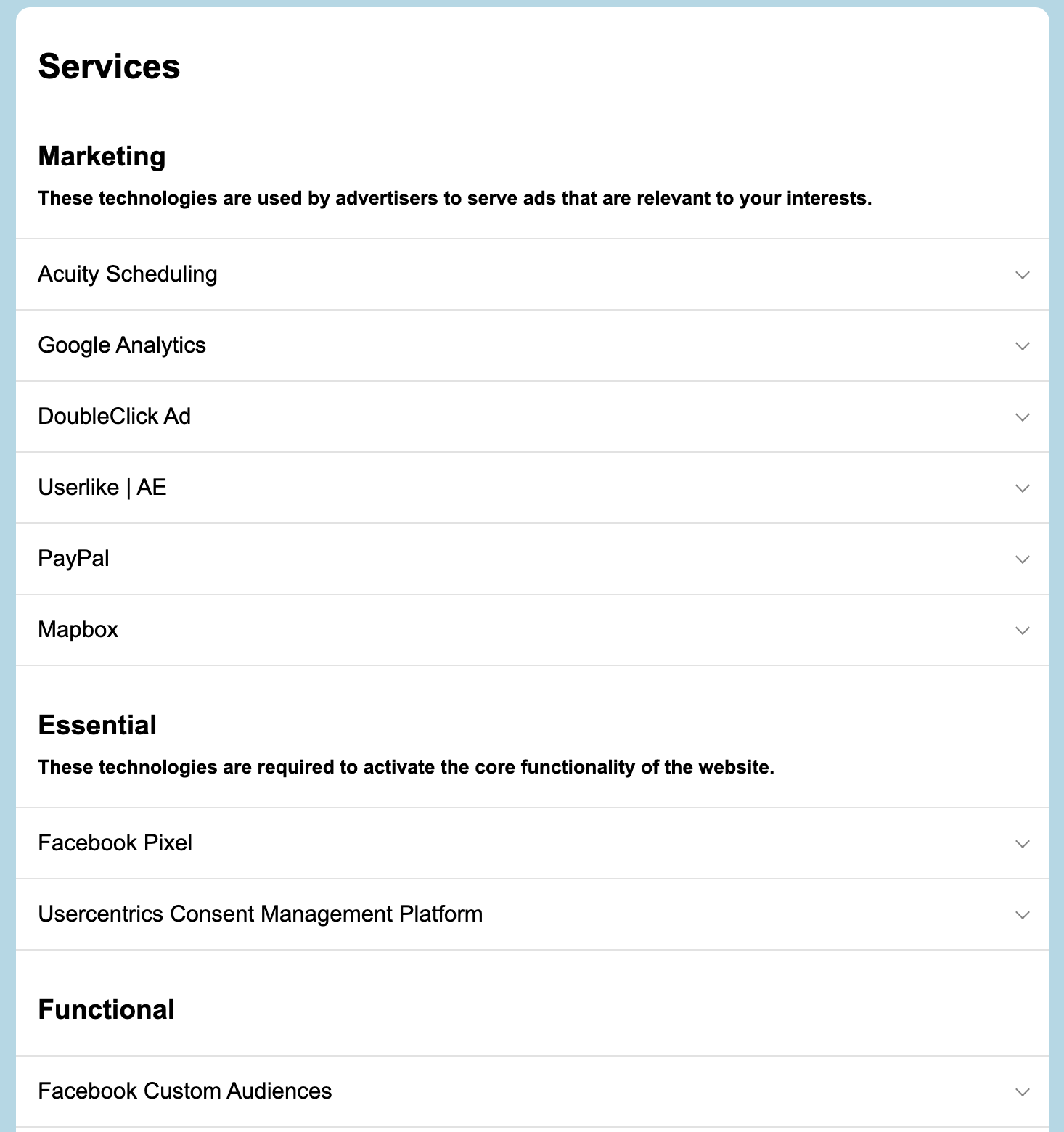 | 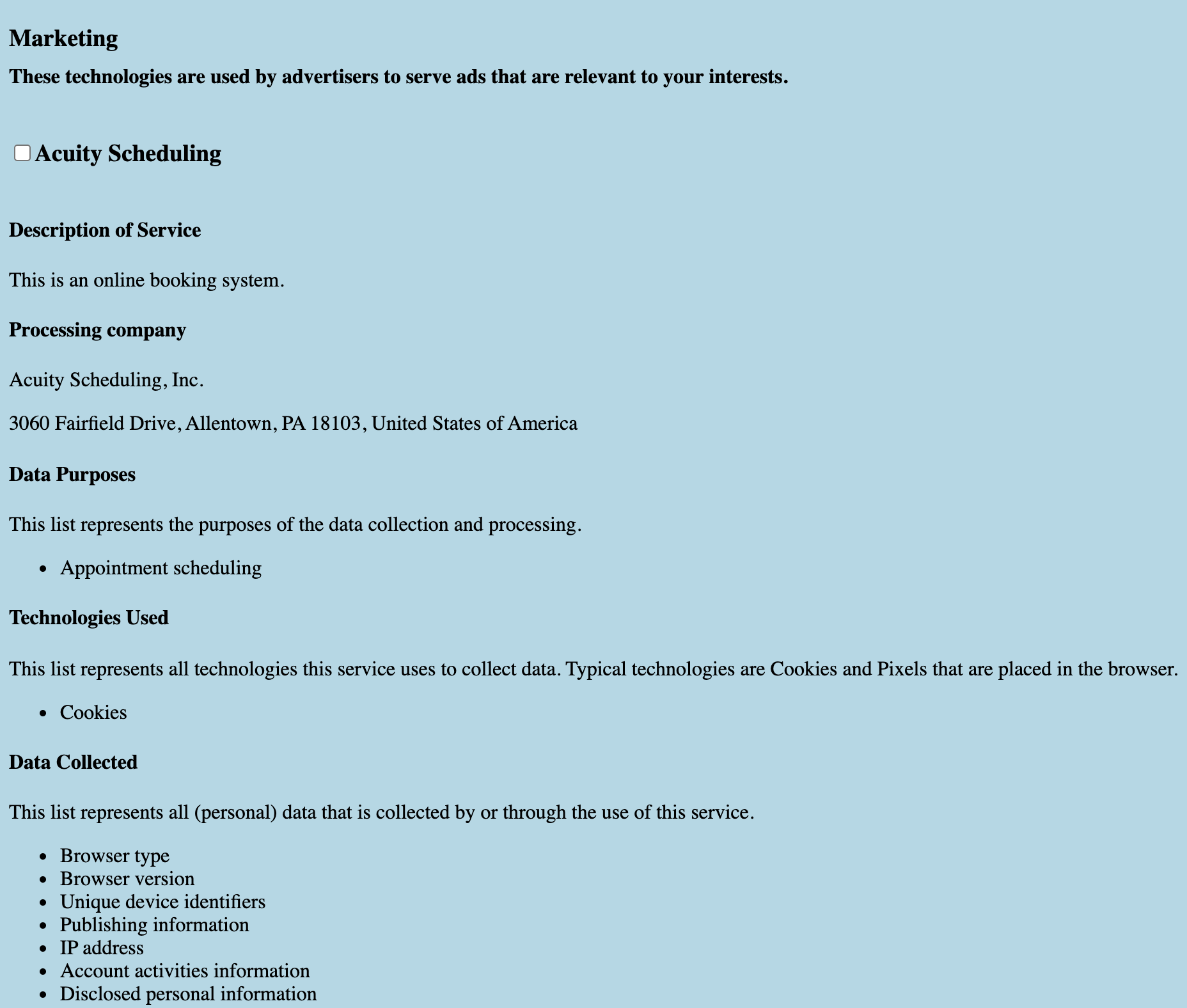 |
| Services grouped by Category with style applied | Services grouped by Category no style applied |
Type category only:
| uc-embedding-type="category-only"uc-styling="true" | uc-embedding-type="category-only"uc-styling="false" |
|---|---|
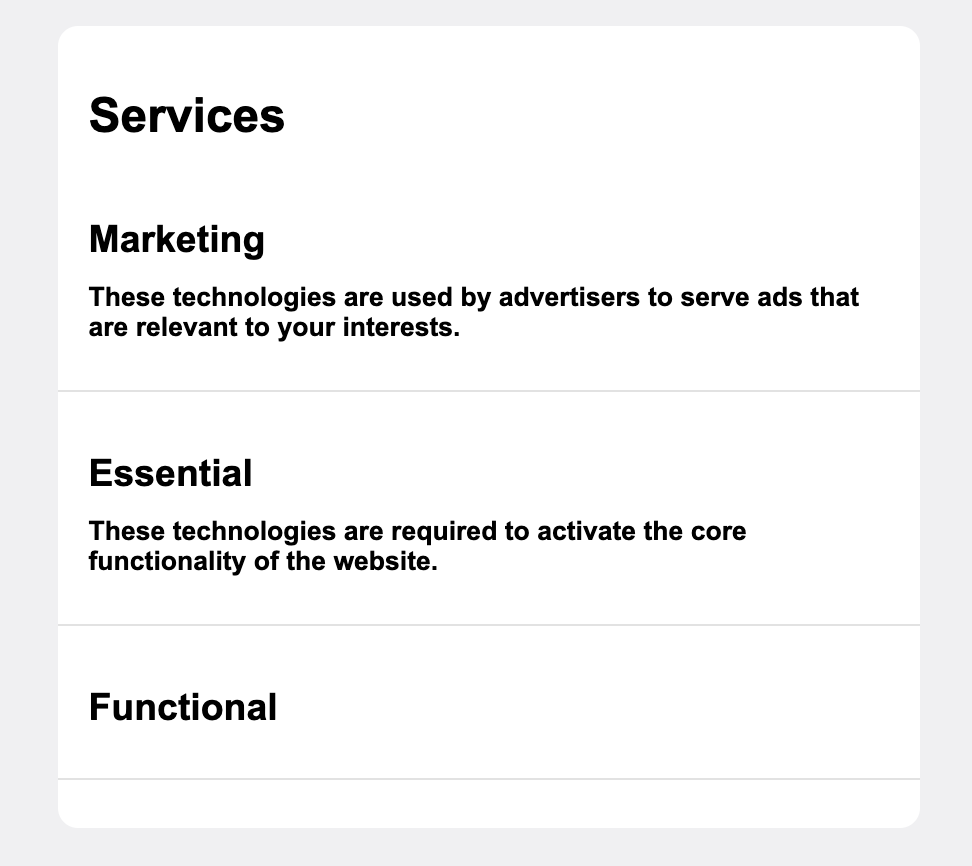 | 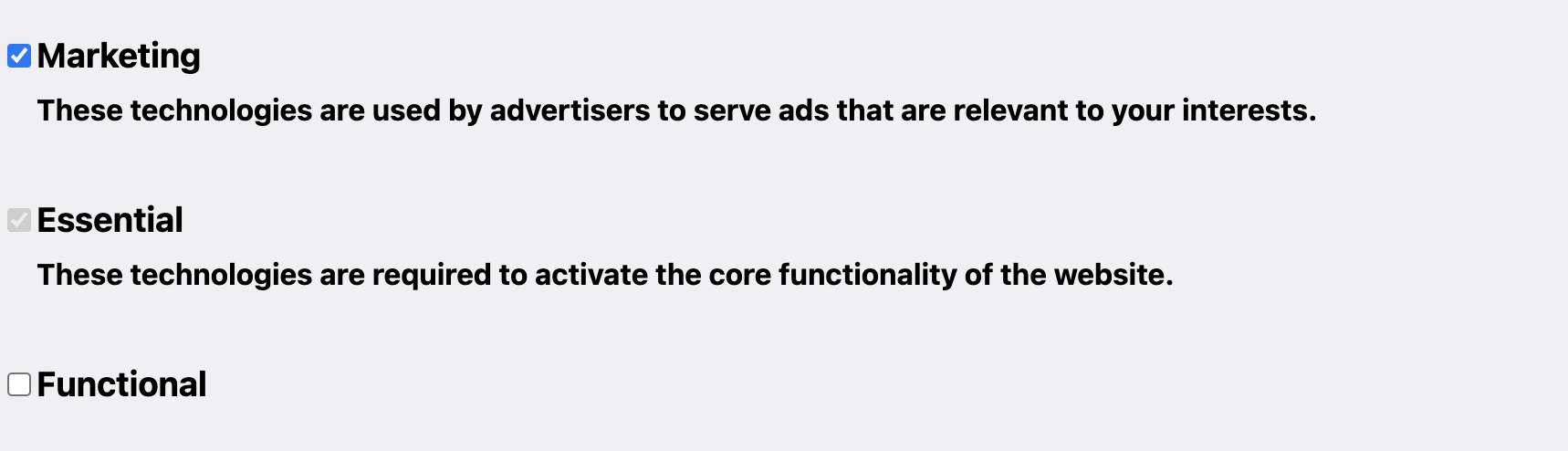 |
| Categories with style applied (no services) | Categories no style applied (no services) |
Embed Data Processing Services with Toggles Choose whether to show toggles on each DPS Note: This option is only available when styled option is enabled
Attribute name: uc-show-toggle Default value: "false"
| uc-embedding-type="all"uc-show-toggle="true" | uc-embedding-type="category"uc-show-toggle="true" | uc-embedding-type="category-only"uc-show-toggle="true" |
|---|---|---|
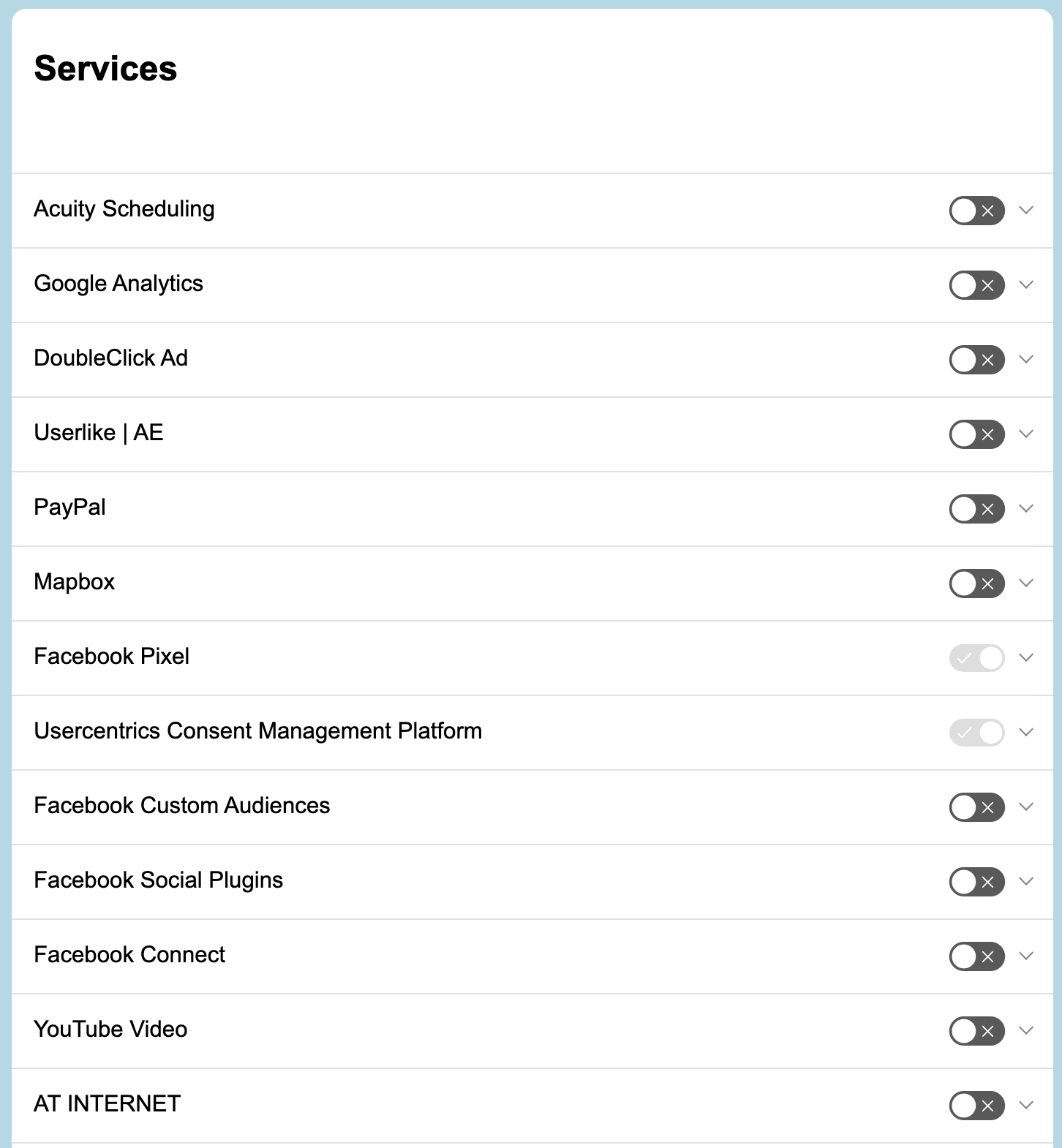 | 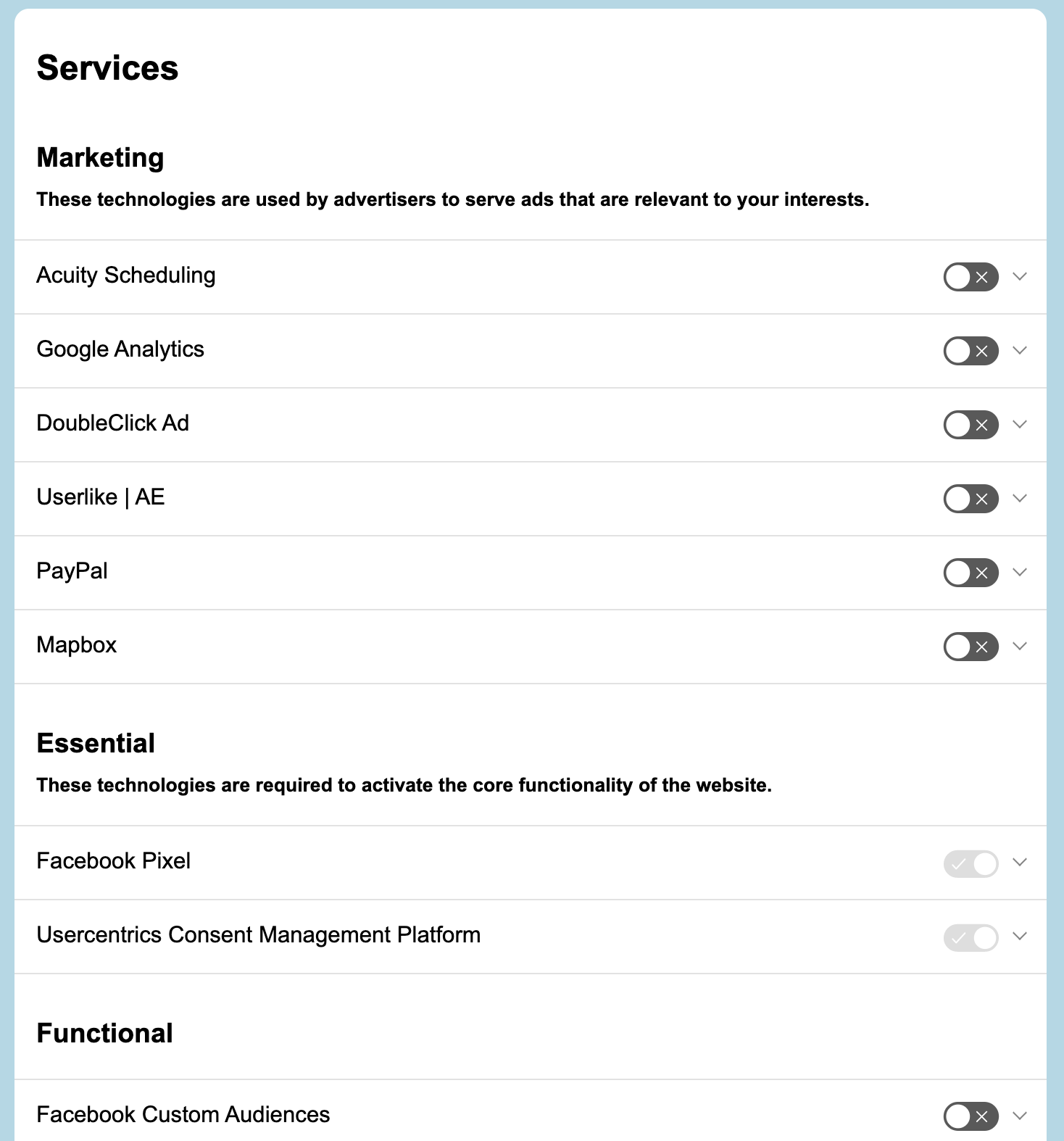 | 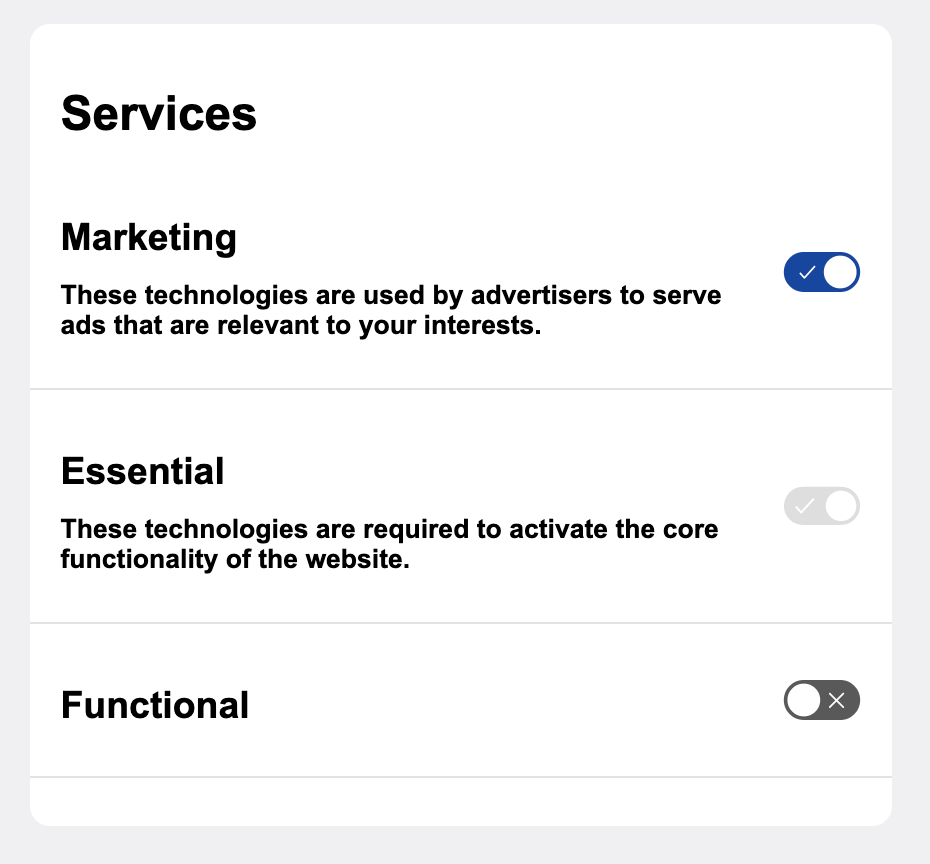 |
| All Services with visible toggles | Services grouped by Category with visible toggles | All Categories with visible toggles (without services) |
It is also possible to customize the toggles' colors by defining CSS rules for each kind of toggle
| Toggle State | CSS Class |
|---|---|
| On | .uc-embed-toggle-button.toggle-on |
| Off | .uc-embed-toggle-button.toggle-off |
| Disabled | .uc-embed-toggle-button.toggle-disabled |
Example:
| CSS | Result |
|  |
Embedding TCF
Setup
If you are using TCF you can embed the Information regarding purposes and vendors by simply defining HTML Div Elements with class="uc-embed-tcf" on your site, which then will be automatically filled. There are options you can specify using specific element attributes. All attributes have default values and do not need to be specified, if the default value is the desired one.
Setup Options
<div class="uc-embed-tcf"
  uc-styling="true"
  uc-embedding-type="purpose">
</div>
Attribute name: uc-styling Default value: "true"
| uc-styling="true" | uc-styling="false" |
|---|---|
 |  |
| There is a specific style applied to all elements in the list, which also includes a collapsable logic for the list items | No style is applied to the HTML Elements |
Embedding type
Attribute name: uc-embedding-type Possible values: "vendor", "purpose" Default value: "vendor"
** Vendor List **
Example:
<div class="uc-embed-tcf"
  uc-styling="true"
  uc-embedding-type="vendor"
  uc-embedding-title="Custom-Headline"
  uc-embedding-vendors="Custom-IAB_V-Headline"
  uc-embedding-non-iab-vendors="Custom-NON_IAB_V-Headline">
</div>
Attribute name: uc-embedding-title Default value: tab name of the second layer ("Vendors")
Embedding List Title for IAB TCF Vendors The title of the sublist of IAB TCF Vendors
Attribute name: uc-embedding-vendors Default value: headline of the IAB TCF Vendor list in the second layer ("Vendors who are part of the IAB TCF")
Embedding List Title for NON IAB TCF Vendors The title of the sublist of NON IAB TCF Vendors
Attribute name: uc-embedding-non-iab-vendors Default value: headline of the NON IAB TCF Vendor list in the second layer ("Vendors who are not part of the IAB TCF")
Embedding List Title for Google Ad Technology Providers (ATPs) The title of the sublist of Google Ad Technology Providers (ATPs)
Attribute name: uc-embedding-atp-vendors Default value: headline of the Google Ad Technology Providers (ATPs) list in the second layer ("Vendors who are part of the Google Ad Technology Providers (ATPs)")
** Purpose List **
Example:
<div class="uc-embed-tcf"
  uc-styling="true"
  uc-embedding-type="purpose"
  uc-embedding-title="Custom-Headline"
  uc-embedding-purpose="Custom-IAB_P-Headline"
  uc-embedding-non-iab-purpose="Custom-NON_IAB_P-Headline">
</div>
Attribute name: uc-embedding-title Default value: tab name of the second layer ("Purposes")
Embedding List Title for IAB TCF Purposes The title of the sublist of IAB TCF Purposes
Attribute name: uc-embedding-purpose Default value: headline of the Purposes list in the second layer ("Purposes")
Embedding List Title for NON IAB TCF Purposes The title of the Sublist of NON IAB TCF Purposes
Attribute name: uc-embedding-non-iab-purpose Default value: headline of the NON IAB TCF Purposes list in the second layer ("Non-IAB Purposes")
Outer HTML Structure without UC style
** Vendor **
<div class="uc-embed-tcf" uc-embedding-type="vendor" uc-styling="false">
  <div class="uc-embed-container">
    <h2 class="uc-embed-headline">Vendors</h2>
    <div class="uc-embed-list">
      <h3 class="uc-embed-list-headline">
        Vendors who are part of the IAB TCF
      </h3>
      <div class="uc-embed-list-item">
        <h4 class="uc-embed-list-item-headline">name</h4>
        <div class="uc-embed-list-item-content">
          <div class="uc-embed-subelement">
            <!-- See Subelement HTML Structure -->
          </div>
          ...
        </div>
      </div>
      ...
    </div>
    <div class="uc-embed-list">
      <h3 class="uc-embed-list-headline">
        Vendors who are not part of the IAB TCF
      </h3>
      <div class="uc-embed-list-item">
        <h4 class="uc-embed-list-item-headline">name</h4>
        <div class="uc-embed-list-item-content">
          <div class="uc-embed-subelement">
            <!-- See Subelement HTML Structure -->
          </div>
          ...
        </div>
      </div>
      ...
    </div>
  </div>
</div>
** Purpose**
<div class="uc-embed-tcf" uc-embedding-type="purpose" uc-styling="false">
  <div class="uc-embed-container">
    <h2 class="uc-embed-headline">Purposes</h2>
    <div class="uc-embed-list">
      <h3 class="uc-embed-list-headline">Purposes</h3>
      <div class="uc-embed-list-item">
        <h4 class="uc-embed-list-item-headline">name</h4>
        <div class="uc-embed-list-item-content">
          <div class="uc-embed-subelement">
            <!-- See Subelement HTML Structure -->
          </div>
          ...
        </div>
      </div>
      ...
    </div>
    <div class="uc-embed-list">
      <h3 class="uc-embed-list-headline">Features</h3>
      <div class="uc-embed-list-item">
        <h4 class="uc-embed-list-item-headline">name</h4>
        <div class="uc-embed-list-item-content">
          <div class="uc-embed-subelement">
            <!-- See Subelement HTML Structure -->
          </div>
          ...
        </div>
      </div>
      ...
    </div>
    <div class="uc-embed-list">
      <h3 class="uc-embed-list-headline">Non-IAB Purposes</h3>
      <div class="uc-embed-list-item">
        <h4 class="uc-embed-list-item-headline">name</h4>
        <div class="uc-embed-list-item-content">
          <div class="uc-embed-subelement">
            <!-- See Subelement HTML Structure -->
          </div>
          ...
        </div>
      </div>
      ...
    </div>
  </div>
</div>
Outer HTML Structure with UC style
** Vendor **
<div class="uc-embed-container">
  <h2 class="uc-embed-headline">Vendors</h2>
  <div class="uc-embed-list">
    <h3 class="uc-embed-list-headline">Vendors who are part of the IAB TCF</h3>
    <div class="uc-embed-list-item">
      <button class="uc-embed-collapsed-button">
        <div class="uc-embed-collapsed-button-content">name</div>
        <i class="uc-embed-collapsed-arrow"></i>
      </button>
      <div
        class="uc-embed-collapse-content"
        style="display: none"
        id="uc-embed-collapsable-..."
      >
        <div class="uc-embed-subelement">
          <!-- See Subelement HTML Structure -->
        </div>
        ...
      </div>
    </div>
    ...
  </div>
  <div class="uc-embed-list" style="display: inline-grid">
    <h3 class="uc-embed-list-headline">
      Vendors who are not part of the IAB TCF
    </h3>
    <div class="uc-embed-list-item">
      <button class="uc-embed-collapsed-button">
        <div class="uc-embed-collapsed-button-content">name</div>
        <i class="uc-embed-collapsed-arrow"></i>
      </button>
      <div
        class="uc-embed-collapse-content"
        style="display: none"
        id="uc-embed-collapsable-..."
      >
        <div class="uc-embed-subelement">
          <!-- See Subelement HTML Structure -->
        </div>
        ...
      </div>
    </div>
    ...
  </div>
</div>
** Purpose**
<div class="uc-embed-tcf" uc-embedding-type="purpose" uc-styling="true">
  <div class="uc-embed-container">
    <h2 class="uc-embed-headline">Purposes</h2>
    <div class="uc-embed-list">
      <h3 class="uc-embed-list-headline">Purposes</h3>
      <div class="uc-embed-list-item">
        <button class="uc-embed-collapsed-button">
          <div class="uc-embed-collapsed-button-content">name</div>
          <i class="uc-embed-collapsed-arrow"></i>
        </button>
        <div
          class="uc-embed-collapse-content"
          style="display: none"
          id="uc-embed-collapsable-..."
        >
          <div class="uc-embed-subelement">
            <!-- See Subelement HTML Structure -->
          </div>
          ...
        </div>
      </div>
      ...
    </div>
    <div class="uc-embed-list">
      <h3 class="uc-embed-list-headline">Features</h3>
      <div class="uc-embed-list-item">
        <button class="uc-embed-collapsed-button">
          <div class="uc-embed-collapsed-button-content">name</div>
          <i class="uc-embed-collapsed-arrow"></i>
        </button>
        <div
          class="uc-embed-collapse-content"
          style="display: none"
          id="uc-embed-collapsable-..."
        >
          <div class="uc-embed-subelement">
            <!-- See Subelement HTML Structure -->
          </div>
          ...
        </div>
      </div>
      ...
    </div>
    <div class="uc-embed-list">
      <h3 class="uc-embed-list-headline">Non-IAB Purposes</h3>
      <div class="uc-embed-list-item">
        <button class="uc-embed-collapsed-button">
          <div class="uc-embed-collapsed-button-content">name</div>
          <i class="uc-embed-collapsed-arrow"></i>
        </button>
        <div
          class="uc-embed-collapse-content"
          style="display: none"
          id="uc-embed-collapsable-..."
        >
          <div class="uc-embed-subelement">
            <!-- See Subelement HTML Structure -->
          </div>
          ...
        </div>
      </div>
      ...
    </div>
  </div>
</div>
Collapse structure
** Collapsed **
...
<div class="uc-embed-list-item">
  <button class="uc-embed-collapsed-button">
    <div class="uc-embed-collapsed-button-content">name</div>
    <i class="uc-embed-collapsed-arrow"></i>
  </button>
  <div
    class="uc-embed-collapse-content"
    style="display: none"
    id="uc-embed-collapsable-..."
  >
    <div class="uc-embed-subelement">
      <!-- See Subelement HTML Structure -->
    </div>
    ...
  </div>
</div>
...
** Opened **
...
<div class="uc-embed-list-item">
  <button class="uc-embed-opened-button">
    <div class="uc-embed-opened-button-content">name</div>
    <i class="uc-embed-opened-arrow"></i>
  </button>
  <div
    class="uc-embed-collapse-content"
    style="display: inline-block; ..."
    id="uc-embed-collapsable-..."
  >
    <div class="uc-embed-subelement">
      <!-- See Subelement HTML Structure -->
    </div>
    ...
  </div>
</div>
...
Subelement HTML Structure
All these HTML Elements can be part of a subelement.
<div class="uc-embed-subelement">

  <!-- Headline of the Subelement -->
  <h5 class="uc-embed-subelement-headline">Subelement Headline</h5>

  <!-- Bullet point list -->
  <ul class="uc-embed-subelement-item-list">
    <li class="uc-embed-subelement-item-list-element">
      Bullet point
    </li>
    ...
  </ul>

  <!-- Link -->
  <a class="uc-embed-link" href="...">text</a>

  <!-- Show more button (Opens second layer of the CMP) -->
  <button class="uc-embed-block-list-view-more-button">
    Show more
  </button>

  <!-- Description -->
  <p class="uc-embed-subelement-description">text</p>

  <!-- Special List (if UC Style is enabled) -->
  <ul class="uc-embed-subelement-block-list">
    <li class="uc-embed-subelement-block-list-element">text</li>
    ...
  </ul>

  <!-- Expandable Link (if UC Style is enabled) -->
  <button class="uc-embed-collapsed-link">
    <div class="uc-embed-collapsed-link-content">label</div>
    <i class="uc-embed-collapsed-arrow"></i>
  </button>
  <div
    class="uc-embed-collapse-content"
    style="display: none"
    id="uc-embed-collapsable-..."
  >
    <!-- All subelements described above can be part of an expandable link content -->

    <!-- Stored Information Subelement -->
    <div class="uc-embed-subelement-stored-info">
      <!-- See Subelement Stored Information HTML Structure -->
    </div>
    ...
  </div>

</div>
Subelement Stored Information HTML Structure Loading and Retry represent states of the process of getting the stored information data, so they don't coexist with Info Headline and Info Data. Retry state should be shown if something goes wrong while loading the data. Info Headline alongside with Info Data represent the success state of getting the data.
<div class="uc-embed-subelement-stored-info">

  <!-- Stored Info Item -->
  <div class="uc-embed-stored-info-item">

    <!-- Stored Info Loading/Retry Text -->
    <div class="uc-embed-stored-info-action">
      <p class="uc-embed-stored-info-action-item"></p>
      ...
    </div>

    <!-- Stored Info Headline -->
    <p class="uc-embed-stored-info-item-headline"></p>

    <!-- Stored Info Data -->
    <div class="uc-embed-stored-info-item-data">
      <p class="uc-embed-stored-info-item-data-element"></p>
      ...
    </div>
  </div>
</div>
Miscellaneous: Other options to configure embeddings
Displaying the hidden essential categories Choose whether to enable showing categories which are marked as "essential" (including related Data Processing Services) and are selected to be hidden from showing on your CMP. You might want to utilize it if you decided to hide categories which are marked as "essential" (including related Data Processing Services) from your CMP but still need to display them in embeddings, e.g. in case of legal requirements.
Attribute name: uc-embedding-show-hidden-categories Possible values: "true", "false" Default value: "false"