

Since the California Consumer Privacy Act (CCPA) came into effect in 2020, businesses processing personal data of California residents have needed to give website visitors, app users, and others the option to opt out of the sale or sharing of their personal information (PI).
A CCPA cookie consent banner that communicates to users about the cookies that collect their personal data is a valuable tool for supporting compliance with the data privacy law. It enables organizations to disclose information about their data operations and provide users with required choices about opting out.
New and stricter CCPA regulatory requirements came into effect January 1, 2026, which affect these consent tools and the experience provided to users. This guide explains how to design a CCPA cookie banner to comply with the updated requirements.
At a Glance
- The major CCPA updates in 2026 are aimed at regulating AI and data privacy challenges with the introduction of the automated decision‑making technology (ADMT), cybersecurity audit, high-risk data processing rules, and data broker responsibilities.
- The new 2026 CCPA cookie banner requirements include the symmetric rules in its UI/UX design, GPC signal confirmation, and dark pattern prohibition.
- Even though CCPA doesn’t require a consent banner, it’s the most practical way to surface the “Do Not Sell or Share My Personal Information” link, provide a Notice at Collection, and inform users about their rights regarding use of CCPA cookies.
- A CCPA banner would follow the opt-out consent model, so the clear and accessible ability to decline CCPA cookies is important, as is transparency about data handling.
- Even though cookie consent requirements are different for CCPA and GDPR jurisdictions, a consent management platform can manage both frameworks from a single interface, using geolocation rules.
- Failure to comply with the GPC signal is the most common entry point for enforcement cases against Sephora, Tractor Supply, and other companies, and the upcoming California Opt Me Out Act increases the risk.
Does the CCPA Require a Cookie Banner?
Not explicitly. Instead, the CCPA stipulates that the websites must feature a “Do Not Sell or Share My Personal Information” link to opt out of the business selling, sharing, or using data for targeted advertising. Another CCPA requirement is to add a Notice at Collection to inform users arriving on a website, for example, when they would begin collecting personal information, e.g. from browsing activities or a purchase transaction.
In practice, a consent management platform (CMP) that displays a “Do Not Sell or Share My Personal Information” banner, or one that also includes a CCPA cookies consent notice, is the most practical tool for meeting these requirements.
GDPR vs CCPA Cookie Banner: What’s the Difference?
CCPA cookie banner is designed for and follows the logic of the opt-out consent model. Under all U.S. state privacy laws to date, including the California Privacy Rights Act (CPRA), in most cases prior user consent is not required to collect and process personal information. The exceptions are most commonly sensitive data and children’s data.
However, notification at the point of collection about data access and use and providing the ability to opt out of certain uses of personal data is required.
Under the EU’s General Data Protection Regulation (GDPR), it’s required to obtain prior consent from users before any data is collected or used.
Learn more about opt in vs opt out consent flows.
Still, the 2026 CCPA updates introduce new requirements governing access to sensitive personal information. The CCPA now includes consumers’ neural, biometric, and health information, along with the data of website visitors under the age of 16 as sensitive information. Greater restrictions on access and more stringent security and use requirements apply to that data.
As Usercentrics CMO Adelina Peltea points out, “Companies already needed to take extra precautions if the data is sensitive or belongs to children, but the kinds of data included are expanding, as are consumers’ expectations around handling it.” Where sensitive data is involved, the requirements are more like those under the GDPR.
Who Needs To Comply With CCPA in 2026?
Not every business with customers in California needs to comply with the CCPA/CPRA. Organizations need to meet at least one of the following compliance thresholds:

Generate USD 25,000,000 or more in annual revenue (adjusted every two years to the Consumer Price Index)
Buy, sell, or share the PI of 100,000 or more California residents or households per year
Earn 50 percent or more of their annual revenue from selling or sharing PI
Failing to comply with requirements, as outlined below in the CCPA cookie compliance checklist, can result in significant CCPA-related penalties, as the landmark enforcement case of the USD 1.35M fine against Tractor Supply Company in September 2025 shows.
What Is a Notice at Collection Under the CCPA?
The CCPA Notice at Collection requirement means that organizations have to make disclosures to consumers before or when data collection starts. Those disclosures need to include information about data collection and use, users’ rights, and how to exercise them. The privacy policy can be part of this notice, and the “Do Not Sell or Share” link enables part of the rights requirement.
The Notice at Collection must be clear and easy to understand for the average person, and include:
Categories of personal information collected, including sensitive personal information
Purposes for data collection and usage
Statement whether the data is sold or shared (with the opt-out link)
Retention period for each category of personal information collected
Link to the privacy policy
A CCPA opt-out banner enables you to display and link to this information, as well as provide the user opt-out options.
CCPA Cookie Banner Requirements: The Compliance Checklist
- The banner is prominently displayed on the first visit to the website to meet Notice at Collection requirement.
- All the categories of cookies and personal data collected are disclosed.
- Purpose of data collection is stated clearly and transparently.
- Explains whether the information is shared or sold.
- Includes a “Do Not Sell or Share My Personal Information” link.
- Links to the privacy policy.
- Includes “Limit the Use of My Sensitive Personal Information” link (if collecting sensitive data).
- Honors Global Privacy Control (GPC) signals.
- Obtains opt-in consent from parent/guardian for minors under 16.
Additional updates for 2026:
- Presents confirmation to the user that a GPC signal has been processed, e.g. displaying “GPC Honored”.
- Provides symmetrical choices, i.e. the opt-out/decline option easily accessible (and, where opt-in is required, both are equally visible and accessible).
- Closing or dismissing the banner without taking an action cannot be construed as the user providing consent (where required).
CCPA Cookie Banner Requirements 2026: Updates Explained
In response to AI and data privacy implications, CCPA requirements have been updated to strengthen consumer data rights in light of evolving algorithms, use of dark patterns, and new technologies. The updates required most businesses to review their policies, notices, internal processes, and/or vendor agreements to meet the new standards. The first requirements came into effect January 1, 2026, but there are several relevant dates:
January 1, 2026
- Public-facing consumer rights mechanisms
- Privacy policy updates
- Dark pattern prohibitions
- Consent management protocols
Unlike previous CCPA updates, these requirements took effect with no delayed enforcement window.
January 1, 2027
- Automated Decision-Making Technology (ADMT) notices and opt-out requirements begin, covering significant decisions in areas such as credit, employment, and healthcare
April 1, 2028
- Businesses must conduct risk assessments for activities initiated in 2026–2027 before starting those activities and submit attestations
- Cybersecurity audits, phased by revenue:
- April 1, 2028 if 2026 gross revenue exceeded USD 100 million
- April 1, 2029 if 2026 gross revenue is between USD 50–100 million
- April 1, 2030 if 2026 gross revenue is under USD 50 million
The Symmetry Requirement for the CCPA Banner Design
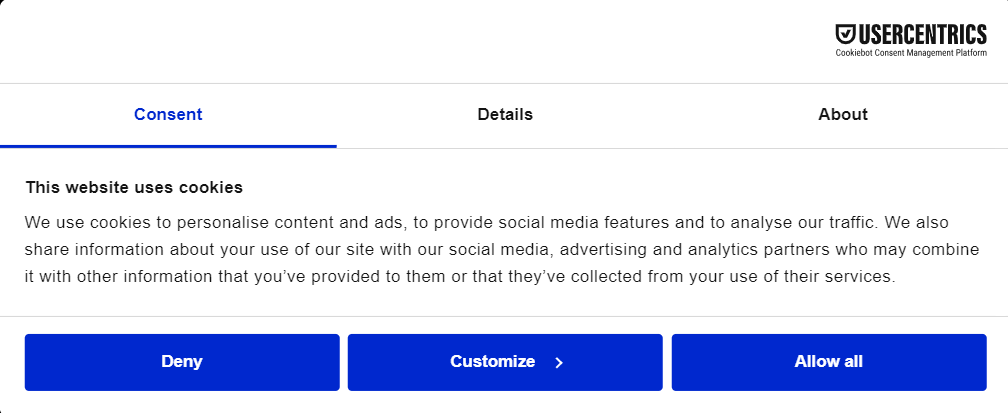
Under the CCPA, consent interfaces must offer “symmetry in choice.” In practice, this means:
An equal number of steps in the opt-in and opt-out flows
Equivalent button pairings, such as “Yes” vs. “No,” or “Accept All” vs. “Decline All”, rather than asymmetric alternatives such as “Accept All” vs. “More Information” or “Yes” vs. “Ask me later”
Equal visual prominence for affirmative and opt-out options in the banner design
In short: the path to opting out must be no harder to find or complete than the path to accepting.
Honda faced a CPPA enforcement action of USD 632,000 in March 2025. One of the issues was offering an asymmetric cookie banner that made opting out more difficult than opting in.
Symmetry in choice: How to make your consent banner CCPA-compliant in 2026
Before updating your banner, audit both the opt-in and opt-out flows. The opt-out request, which should be accessible via the “Do Not Sell or Share My Personal Information” link, should require no more steps than the opt-in flow. Also ensure “No” or “Decline All” buttons appear wherever “Yes” or “Accept All” appear, at equal size and prominence.
Closing a Banner No Longer Implies Consent
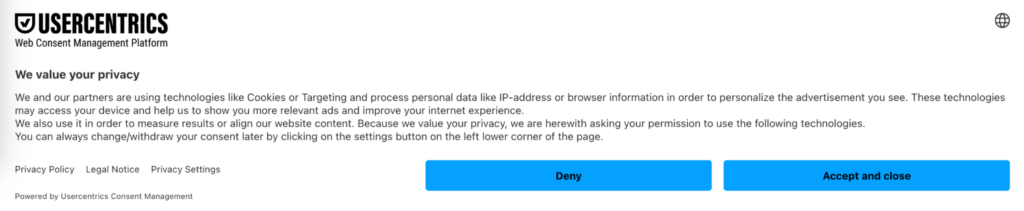
Previously under the CCPA, there was no legal provision about the action of closing a consent banner as an indicator of a preferred consent option. As of 2026, though, the law’s update states that “closing or navigating away from a pop-up window […] shall not constitute consent” without an affirmative “I Accept” signal from a user. This is now in line with GDPR requirements as well.
While in most cases organizations don’t need prior opt-in consent from users, in cases where they do (sensitive data or children’s data), valid consent has to be an active and voluntary action. Construing closing a consent banner without making a choice as the user consenting is not allowed. It is now considered a dark pattern, and California regulators have identified dark patterns as an enforcement priority.
Closing the banner: How to make your consent banner CCPA-compliant in 2026
Ensure your consent banner design includes clear, relevant information about user choice, with equally visible and accessible options to accept or decline consent for data use. If the banner has a close option (e.g., a clickable X in the top corner) and a user closes it (or ignores and scrolls past) this cannot be considered giving consent and any data collection or use requiring prior opt-in consent cannot begin.
GPC Opt-Out Confirmation Is Now Mandatory
Global Privacy Control (GPC) is a browser-based signal that communicates a visitor’s preference to opt out of the sale or sharing of their personal data. Several U.S. state privacy laws now recognize GPC as a valid opt-out mechanism. (As of early 2026, 12 states’ privacy laws require honoring the GPC or other Universal Opt-Out Mechanism.)
GPC is not the only recognized opt-out signal under CCPA. Businesses must respond to any commonly recognized opt-out preference signal in the same manner. GPC is simply the most widely adopted at present, and is supported by Usercentrics CMP. Provisions of the California Opt Me Out Act (effective January 2027) will make the requirements regarding opt-out signal technologies and honoring signals even more strict.
GPC: How to make your consent banner CCPA-compliant in 2026
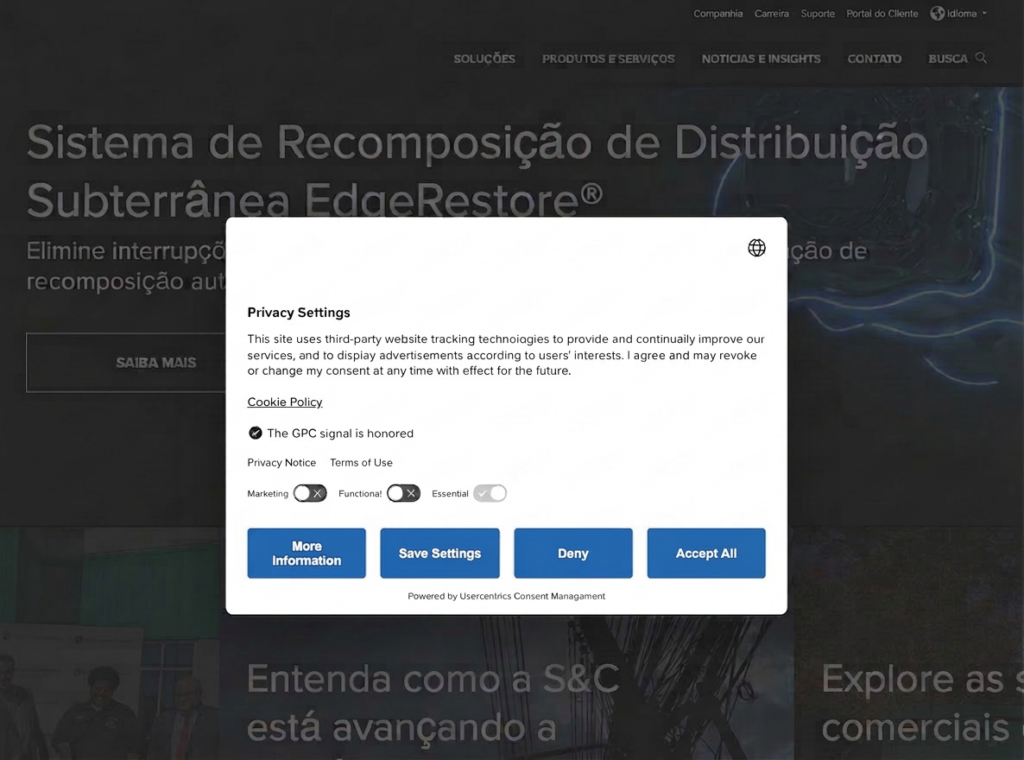
To meet CCPA requirements for GPC, websites must:
- Recognize incoming GPC signals
- Treat them as valid opt-out requests
- Notify the visitor that their signal has been processed (e.g., “Opt-out Signal Honored” or “The GPC signal is honored”) and will have the effect of opting them out of the sale and sharing of their personal information
What’s Coming: The California Opt Me Out Act
The California Opt Me Out Act, passed in 2025 and effective January 1, 2027, requires all browsers operating in California to offer opt-out preference signal (OOPS) functionality — including support for GPC — with clear, accessible descriptions of what the signal does and how to enable it.
The Act reinforces and extends existing CCPA obligations. Where the CCPA requires businesses to honor GPC signals, the California Opt Me Out Act works from the browser side, making it significantly easier for visitors to activate and deploy those signals in the first place. The practical effect is that more California residents will likely use opt-out signals, and businesses will see a higher volume of GPC requests to process and confirm.
What the California Opt Me Out Act means for multi-state businesses
The California Opt Me Out Act applies only in California, so to people located there and their browsers. Privacy laws in many other states do not require browsers to offer OOPS functionality, at least not yet.
Businesses operating across multiple states will need to account for this inconsistency, ensuring GPC and similar signals are handled correctly for California visitors without assuming equivalent obligations apply elsewhere. As noted earlier, however, 12 states currently require honoring some sort of opt-out signal, and more are likely to follow.
CCPA vs. GDPR Cookie Banner: Key Differences
The table below provides the CCPA vs GDPR cookie banner difference details.
| Requirement | CCPA | GDPR |
| Consent model | Opt-out consent | Opt-in consent |
| Cookie management | Can load before user action | Load only after user consent |
| “Do Not Sell or Share” link requirement | Legally required | Not applicable |
| Honoring GPC/UOOM | Legally required | Not legally required (consent withdrawal or right to object are similar requirements in some processing contexts) |
| User notification | Legally required (Notice at Collection must be provided at or before the point of data collection) | Legally required (comprehensive transparency notice must be provided at the time of collection, per Arts. 12, 13, 14 GDPR) |
| Consent record-keeping requirements | Legally required (records of consumer requests and responses must be retained for a minimum of 24 months) | Legally required [controllers must be able to demonstrate that consent was validly obtained under Article 7(1); no prescribed retention period] |
Despite varying requirements, businesses operating in the U.S. and EU don’t need to create separate cookie banners to comply with both the CCPA and GDPR. Usercentrics consent management platforms have geolocation functionality and enable flexible configuration so the right user sees the right information and is offered the legally required consent options — anywhere in the world.
Real-World CCPA Enforcement: What Happens if You Get It Wrong
Non-compliance with CCPA can have a variety of negative consequences. It erodes the trust with customers who have rising concerns about access to their data, AI ethics, cookie tracking, and other technical concerns.
Most notably, though, CCPA non-compliance can result in hefty fines and other regulatory penalties:
Sephora (USD 1.2 million, August 2022): Fined due to the failure to disclose sales and to honor GPC signals. Sephora was obligated to clarify its online disclosures, update the privacy policy, honor GPC signals, and review its service provider agreement.
Healthline (USD 1.55 million, July 2025): The health information website failed to provide an opt-out mechanism from targeted advertising, violating the purpose limitation principle, deceiving its customers, and maintaining non-compliant contracts.
Tractor Supply (USD 1.35 million, September 2025): The nation’s largest rural lifestyle retailer also didn’t provide effective opt-out mechanisms and disclosed personal information to third parties. Other violations included failures to maintain privacy policy, inform job applicants of their privacy rights, and honor the GPC signal.
Honda (USD 632,000, March 2025): The company violated Californians’ privacy rights by offering an asymmetric cookie banner, requiring verification and complicating the opt out process, and sharing consumers’ personal information with ad tech companies under non-compliant contracts.
Disney (USD 2.75 million, February 2026): The biggest fine to date as of early 2026 due to the failure to provide effective opt-out mechanisms and recognize the GPC signal.
4 Steps To Support CCPA/CPRA Cookie and Consent Compliance
The following steps cover what your organization needs to do to meet current and updated CCPA requirements for your website and consent banner.
1. Determine Whether Your Business Needs To Comply With the CCPA/CPRA
The CCPA/CPRA applies to for-profit businesses that meet at least one of three threshold criteria— annual gross revenue over USD 25 million, 100,000 or more CA residents’ data processed annually, or more than 50 percent annual revenue from data sales or sharing). The first step is to confirm whether your business meets CCPA threshold criteria.
Review your financial statements to determine your gross annual revenue and what percentage of your income comes from selling or sharing PI. Also, conduct an audit to determine how many California residents’ PI your business handles annually. Many businesses that run advertising will meet at least one compliance threshold.
2. Audit Cookies and Tracking Technologies on Your Site
Identify all the cookies and other tracking technologies in use on your website, including who sets them, and what data they collect. If you collect sensitive or children’s data, you may need consent before they fire, or you may just need to ensure GPC signals and other opt-outs are honored.
Make sure that your privacy policy includes clear information on your data collection and processing practices, including the types of cookies used and types of data collected, as well as the purposes for collection. And make sure users have easy access to opting out of data sale, sharing, or targeted advertising via the “Do Not Sell or Share…” link.

3. Configure Your “Do Not Sell or Share” Opt-Out Mechanism and GPC Signal Recognition
Your website should be able to recognize the GPC signal for visitors in California and from other states where it’s required, and they should also see a clear and prominent notice that the opt-out signal has been honored.
Visitors must also have easy access to a “Do Not Sell or Share My Personal Information” link, often located in the footer. If they opt out of sale, sharing, and/or targeted advertising, you must honor that and stop collecting or processing their data as soon as possible (within 15 business days from receipt).
4. Design a CCPA-Compliant Privacy Notice and Opt-Out Mechanism
Under the CCPA’s opt-out model, consumers have the right to be informed about data collection before or at the point it occurs, and to direct you not to sell or share their personal information. A compliant implementation should:
Display a Notice at Collection at or before the point of data collection, wherever that occurs on your site
Clearly disclose what categories of personal information you collect and the purposes for which you collect it (such as analytics, personalization, or targeted advertising)
Indicate how long you retain each category of personal information, or the criteria used to determine that period
Inform users whether their personal information is sold or shared with third parties
Provide a clearly visible “Do Not Sell or Share My Personal Information” link, accessible from your homepage and any page where personal information is collected
Ensure opting out is no more difficult than any opt-in mechanism you offer
Display visible confirmation — such as “Opt-Out Request Honored” — when a user exercises their opt-out right, including via a GPC signal
Honor opt-out requests as soon as feasibly possible, and no later than 15 business days from receipt
How Usercentrics Helps With CCPA Cookie Banner Compliance
Usercentrics CMP includes a set of features designed to help your organization meet CCPA cookie banner requirements and manage consent across jurisdictions today and as the law continues to evolve.
Automated cookie scanning identifies all cookies and tracking technologies on your website, giving you an accurate picture of what needs to be disclosed and managed. Pre-configured CCPA banner templates are built with symmetrical Accept and Decline options, supporting the 2026 symmetry requirement out of the box.
GPC signal recognition and processing is built in, with confirmation displayed to visitors as required under the updated regulations. The “Do Not Sell or Share My Personal Information” link can be configured directly within the platform, alongside consent logging and an audit trail to support compliance reviews.
For multi-state operations, smart geotargeting displays the CCPA banner only to California visitors, avoiding unnecessary friction for visitors in other regions. And because U.S. state privacy laws and the GDPR operate in parallel for many businesses, Usercentrics CMP supports both frameworks from a single platform so consent flows for different jurisdictions can be managed without maintaining separate systems.

Join our growing community of data privacy enthusiasts now. Subscribe to the Usercentrics newsletter and get the latest updates right in your inbox.
