
If you operate a Wix site and collect personal data through cookies or tracking technologies, privacy compliance isn’t something to defer. Regulatory fines, disrupted ad tracking, and visitors who don’t trust how you handle their data are all consequences. A cookie banner is one of the most important steps toward getting this right.
A cookie banner appears when someone first visits your site. It tells them how you use cookies, requests their consent where required, and gives them control over what they agree to share.
Usercentrics is the officially recommended consent management solution within Wix’s Compliance, Privacy & Cookies settings. It is available in the Wix App Market and serves as the default solution suggested in Wix’s compliance configuration.
Here’s how to set up a Usercentrics Wix cookie banner in 5 minutes.
At a glance
- Wix’s native cookie banner has been discontinued for new sites, and Usercentrics is the official recommended solution.
- Usercentrics for Wix can be installed directly from the Wix dashboard or App Market in minutes.
- The free plan includes unlimited banner views, GDPR compliance, and Google Consent Mode v2 at no cost.
- The premium plan adds CCPA support and 60+ languages for €7/month.
- Once active, the banner scans your site automatically, records consent, and passes signals to Google’s ad tools.
Does your Wix website need a cookie banner?
If your Wix site uses tracking cookies or technologies, you likely need a cookie banner. Analytics tools, ad pixels, embedded videos, and contact forms can all set cookies or collect personal data, which triggers consent requirements under regulations like the EU’s General Data Protection Regulation (GDPR) and ePrivacy Directive.
If your website has visitors from the EU, UK, or California, Wix cookie consent is not optional. Under the GDPR, non-compliance can result in fines of up to €20 million or 4% of annual global turnover. Under the California Consumer Privacy Act (CCPA), businesses face up to $7,500 per intentional violation. These aren’t abstract risks — regulators have issued fines to businesses of all sizes, including small ones.
Beyond the legal side, a cookie banner is also a signal to your visitors. It shows that you take their privacy seriously, which matters more than most site owners realize. Visitors who feel in control of their data are more likely to engage, convert, and return.
What to expect from a Wix cookie banner
Understanding exactly what a cookie banner does makes it easier to use one effectively. A cookie banner manages consent for the cookies and tracking technologies on your site. Thus giving visitors a clear choice, storing their preferences, and ensures non-essential tools only run when permission is granted.
But a cookie banner is only one part of privacy compliance. It doesn’t replace your Wix privacy policy, handle data subject access requests, or cover how you process and store personal data behind the scenes. Relying on it alone leaves important gaps.
Think of the banner as the visible front end of your privacy setup. It’s the part visitors interact with and the first thing regulators typically check, but it needs to work alongside your policies, processes, and documentation to form a complete approach. This is why the removal of Wix’s native solution matters — it leaves new site owners without a built-in way to manage that critical consent layer.
Wix’s native cookie banner vs. Usercentrics: what’s changed?
Wix previously offered a built-in cookie consent tool, but it has been discontinued for new sites. If you’re setting up a Wix cookie consent banner today, Usercentrics is the official recommended solution within Wix’s Compliance, Privacy & Cookies settings and is available through the Wix App Market.
This isn’t just a gap-filler. Usercentrics brings purpose-built consent management to Wix, with automatic cookie scanning, support for 60+ languages, Google Consent Mode v2 integration, and a free tier that covers the essentials for most small sites. It’s a more capable solution and it’s built to handle Wix privacy compliance as your website evolves.
How to add a cookie banner to your Wix site
Adding the Usercentrics Wix cookie consent banner to your site is straightforward. Here’s how to get set up.
Step 1: Install Usercentrics for Wix from the Wix Marketplace
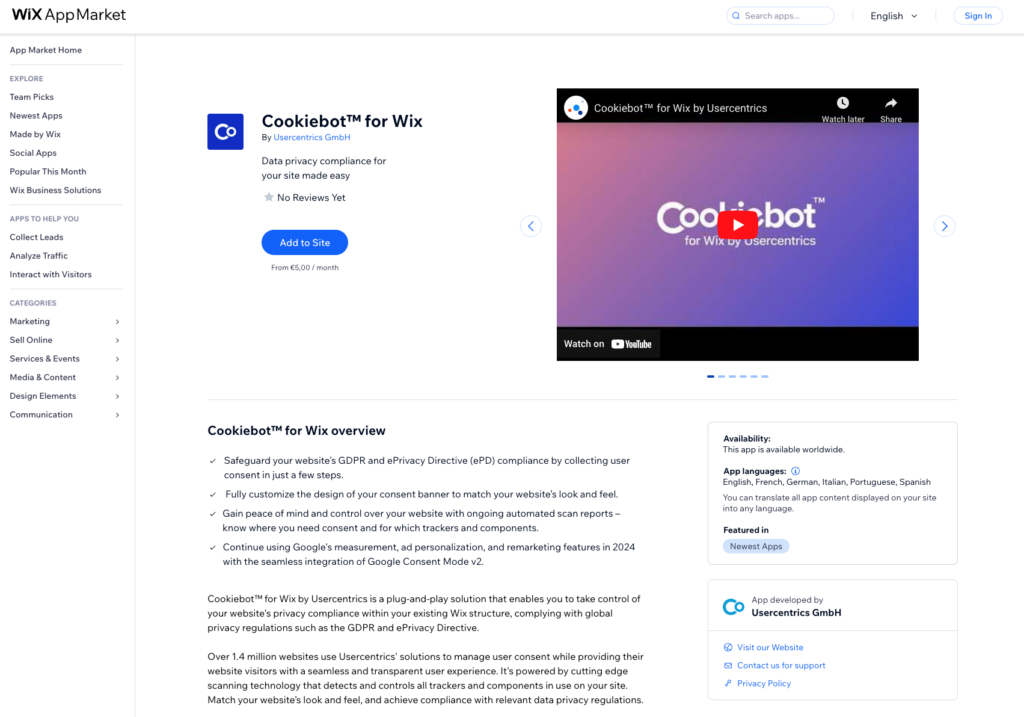
To set up your Wix cookie banner, start by installing the Usercentrics for Wix app from the Wix App Market.
You can find the Usercentrics app directly through the Wix App Market by searching for Usercentrics.
Both paths lead to the same installation page, so use whichever is easiest.
Step 2: Choose your permissions
Review the app permissions carefully before proceeding. These permissions define what Usercentrics can access on your site to manage consent. Once you’re satisfied, click Agree & Add.
This installs the app and connects it to your Wix account, enabling it to manage consent behavior across all your site’s pages.
Step 3: Run a website scan
With the app installed, Usercentrics will scan your site to identify the cookies and trackers currently running. This step matters because you can only ask visitors to consent to what you can actually document.
The scan runs automatically and builds out your cookie list without requiring any manual categorization on your end.
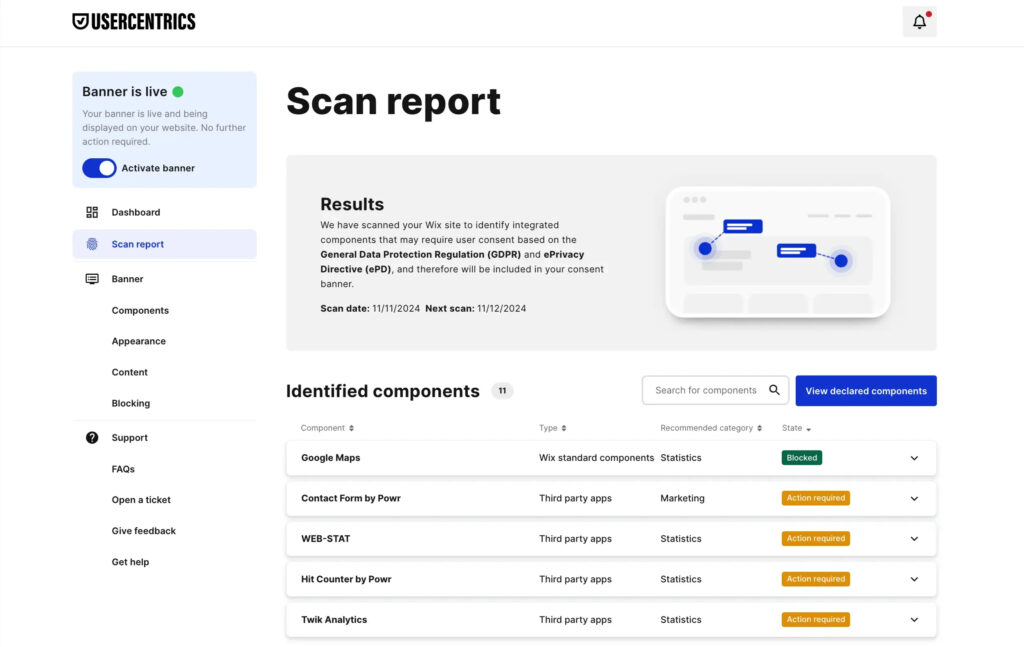
It’s worth reviewing the results before moving on, as this list forms the basis of what your banner discloses to visitors.
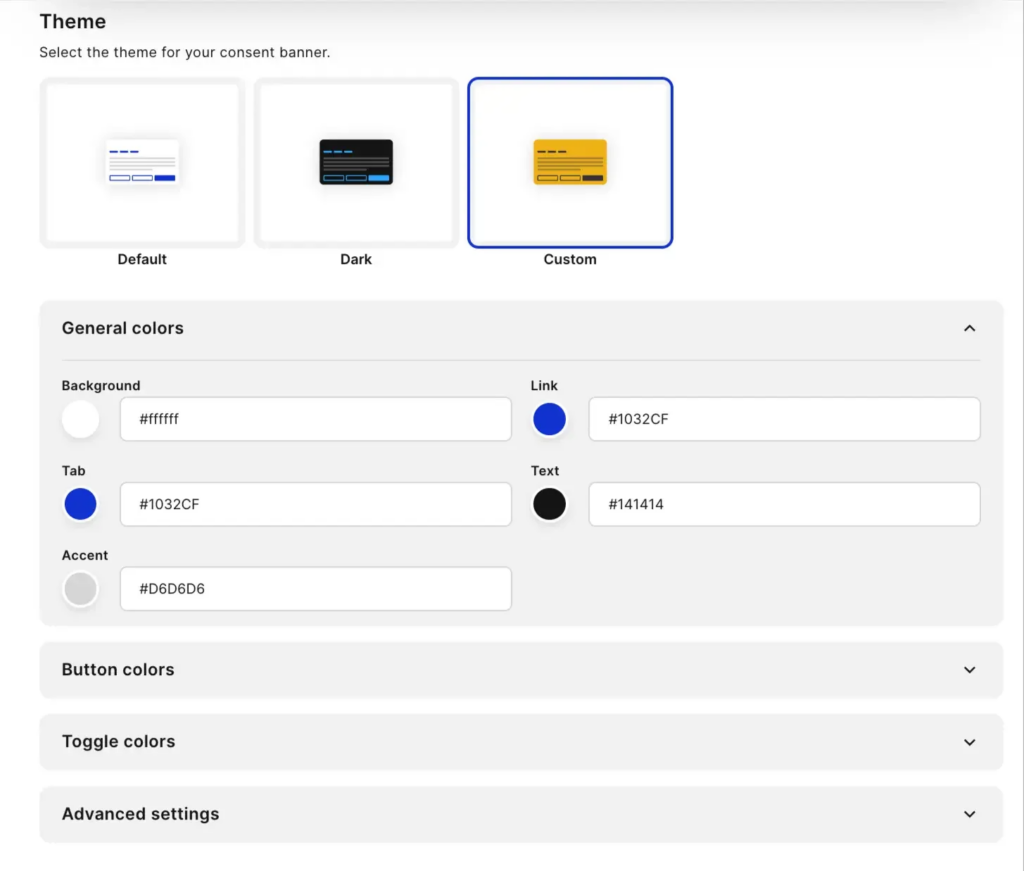
Step 4: Customize your banner
With your scan results in hand, you can now customize your Wix cookie banner to match your website’s design and meet your specific needs.
You can set the banner layout, choose between light and dark themes, select your default language, and add links to your privacy policy and cookie policy. Making sure those policy links are accurate and up to date is part of a company’s compliance obligation, not just a design detail.
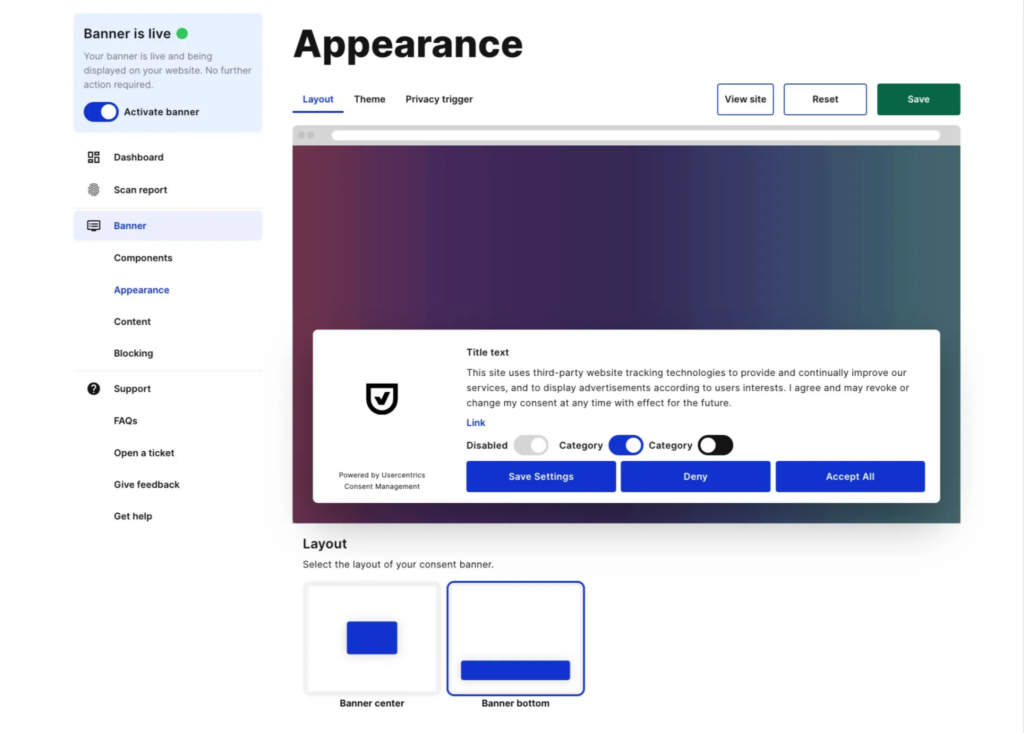
Free plan users have access to a solid set of customization options that are more than enough to get started.
On the premium plan, brands get full control over banner position, styling, intro message, button labels, and the placement and appearance of the privacy trigger icon that lets returning visitors update their preferences.
Step 5: Activate and monitor
Once your banner is configured, activate it for Wix GDPR compliance. From that point, it will display to visitors based on their location and the consent rules you’ve set.
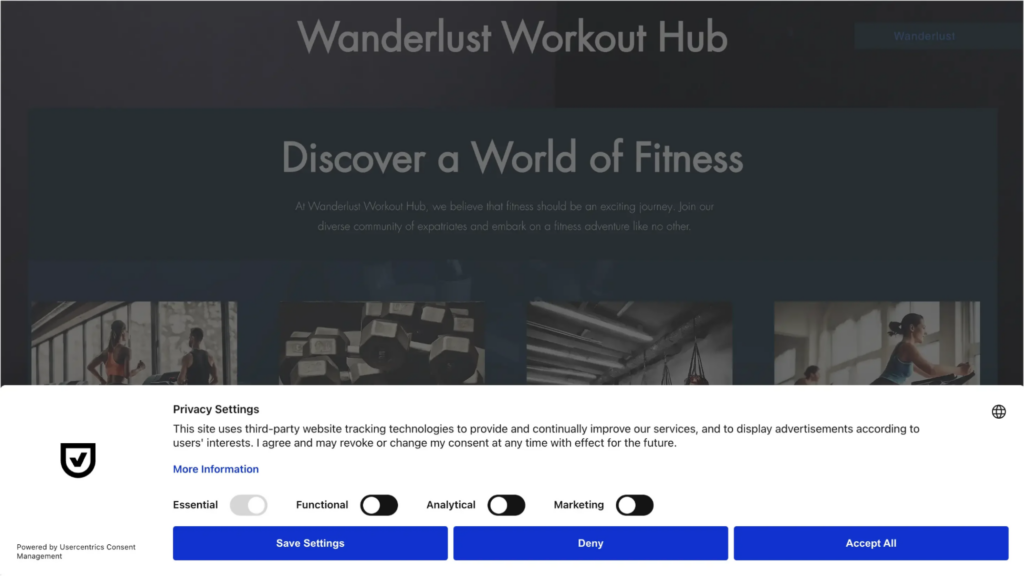
The Usercentrics dashboard lets you monitor consent rates over time and update your cookie list whenever your site changes, whether that’s adding a new analytics tool, a booking widget, or a third-party embed.
Keeping the banner current is part of maintaining compliance, not a one-time setup task.
Free vs. paid: which Usercentrics for Wix plan is right for you?
Usercentrics offers two plans for a Wix cookie consent banner. A free tier that covers core compliance essentials, and a premium tier for sites that need more flexibility or serve international audiences.
Here are the key differences:
| Feature | Free (€0/month) | Premium (€7/month) |
| Unlimited banner views | ✓ | ✓ |
| GDPR compliance | ✓ | ✓ |
| Google Consent Mode v2 | ✓ | ✓ |
| Block interaction until consent | ✓ | ✓ |
| Light and dark themes | ✓ | ✓ |
| Control which pages show the privacy trigger | ✓ | ✓ |
| 1 default language | ✓ | ✓ |
| CCPA support | — | ✓ |
| 60+ languages | — | ✓ |
| Full banner position control | — | ✓ |
| Custom styling, intro message, button labels | — | ✓ |
| Custom privacy trigger placement and icon | — | ✓ |
The free plan covers the most common compliance scenario: a site with EU or UK visitors that needs GDPR coverage and Google Consent Mode v2.
However, if your audience is international, or if you have visitors from California and need CCPA support, the premium plan is the logical next step at €7/month.
Why cookie consent matters beyond compliance
Getting cookie consent right does more than reduce legal risk. It helps ensure your site can be used by visitors in different regions while keeping your analytics and advertising tools working as intended.
For visitors in the EU and UK, GDPR and ePrivacy rules require explicit permission before non-essential cookies run.The Usercentrics cookie banner extension handles this by presenting clear choices and recording each decision, creating an audit trail you can rely on if your setup is ever reviewed.
For California traffic, CCPA requirements add a different layer. Visitors need a clear way to opt out of the sale or sharing of personal data, typically through a “Do Not Sell or Share My Personal Information” option. A location-aware setup shows this automatically where it applies, so you’re not managing separate experiences manually.
The impact on advertising is where many site owners see the difference day to day. With Google’s Consent Mode v2, tools adjust their behavior when someone declines tracking instead of switching off completely. That means conversion modeling can continue and remarketing audiences don’t disappear overnight — helping campaigns remain measurable even as more visitors choose stricter privacy settings.
Together, this is what a solid consent setup really delivers: regulatory coverage, documented proof of choices, and a marketing stack that can still function in a privacy-first environment.
Learn more about how Privacy-Led Marketing strategies are building brand loyalty.
Wix privacy compliance doesn’t have to be complicated
Privacy regulations don’t stand still, and neither does your site. Every new tool you add — from analytics to booking widgets — can introduce cookies that need to be disclosed and, where required, consented to. That’s why compliance isn’t a one-time setup; it works best with a solution that keeps up with how your site actually evolves.
Usercentrics for Wix automates the heavy lifting, from scanning and consent recording to passing signals to your tools. The free plan covers the essentials for most sites, with a premium option available as your needs grow.
Whether you’re setting things up for the first time or refining an existing configuration, achieving privacy compliance on Wix is often more straightforward than site owners expect.

Join our growing community of data privacy enthusiasts now. Subscribe to the Usercentrics newsletter and get the latest updates right in your inbox.
