

How to Create a Squarespace Privacy Policy for Your Website
A privacy policy is rarely the reason a website gets launched. It sits somewhere between the contact page, the cookie banner, and the terms no one wants to think about. But for most Squarespace websites, it’s one of the most important pages to have in place.
Analytics tools, contact forms, newsletter signups — even simple websites collect personal data. A privacy policy explains what information is being collected, why it is being collected, and what visitors can expect when they use the site.
Getting it right doesn’t have to be complicated. With the right information in place and a clear location on the site, a privacy policy can be simple, compliant, and easy for visitors to understand.

At a Glance
- Most Squarespace sites collect personal data in some form, which triggers privacy policy requirements under laws like the GDPR and the CPRA.
- Squarespace’s own privacy policy covers Squarespace as a platform, not your website or business.
- Any Squarespace site that uses contact forms, analytics, or ecommerce is collecting personal data and needs its own privacy policy.
- The laws that apply depend on where your website visitors are, not where you are located.
- Squarespace’s built-in cookie tools do not manage third-party scripts or provide the granular consent required under GDPR.
What Data Does a Typical Squarespace Website Collect?
Squarespace is a popular all-in-one website builder used by small businesses, freelancers, portfolio creators, and online stores. Its ease of use means most site owners get up and running quickly. But Squarespace data collection starts the moment the site goes live.
Built-in features process data by default, including contact forms collect names, email addresses, and any information submitted by visitors. Additionally, Squarespace commerce, booking tools, and analytics all collect information without any action from your website visitors.
Third-party tools can expand that data collection further. Google Analytics and Meta Pixel add tracking, email marketing tools like Mailchimp or ConvertKit process subscriber data, and payment providers such as Stripe and PayPal handle financial information. Each integration adds new data flows that should be disclosed in your privacy policy.
It’s also worth noting that Squarespace is a U.S.-based company, and visitor data is processed on servers in the United States. For visitors from the EU or EEA, this constitutes an international data transfer. Squarespace relies on Standard Contractual Clauses (SCCs) and the EU–U.S. Data Privacy Framework to cover these transfers. Your privacy policy should reflect that.
Does My Squarespace Website Need a Privacy Policy?
The short answer is yes. Squarespace’s privacy policy explains how the company handles its own data. But it does not cover your website or your business. That responsibility is up to businesses using the platform, which have to publish their own policies.
In addition, the data privacy laws you need to comply with depend on where your visitors are located, not where you are based. If people in EU Member States visit your site, the General Data Protection Regulation (GDPR) can apply to how you process their data.
U.S. laws work similarly: the California Privacy Rights Act (CPRA) applies when you serve California residents, and the California Online Privacy Protection Act (CalOPPA) applies to commercial sites accessible to California users.
Common Squarespace features trigger these requirements. Contact forms, newsletter sign-ups, analytics tools, cookie-based tracking, ecommerce checkouts, and Acuity booking pages all process personal data. So if your site includes any of these, a privacy policy for your Squarespace website is generally required.
What Must a Squarespace Privacy Policy Include?
The GDPR and CPRA have different legal frameworks, but their disclosure requirements overlap significantly. A well-structured policy can address both data privacy laws by covering the following areas.


How to Create a Privacy Policy for Your Squarespace Website?
A Squarespace website privacy policy needs to include the eight elements listed above. Also, to collect compliant Squarespace cookie consent and develop an accurate privacy policy, companies have three different options.
Each has different levels of effort and risk depending on how tailored you need the policy to be.
Option 1: Write Your Own
This is not recommended unless you have, or have access to, legal expertise. A compliant Squarespace policy requires you to track every data processing activity, identify all third-party tools, document the legal basis for each purpose, and update the policy as regulations, your tools, and your business change.
Gaps, even unintentional ones, create risk. Therefore, for most site owners, this is not the most practical path.
Option 2: Use a Squarespace Privacy Policy Template
Using a template is another common approach that balances efficiency with the need for a formal document. To assist with this, Squarespace offers its own sample language designed to cover platform-specific functions like system data, functional cookies, and customer accounts.
However, because templates and samples are designed to be broad, they will require manual adjustment to accurately reflect your specific use of tools like Acuity Scheduling or third-party marketing integrations. They are also not tailored for specific data privacy laws. So they carry their own risks if used without customization. And the need to maintain it remains.
Option 3: Use the Usercentrics Squarespace Privacy Policy Generator
The Usercentrics Privacy Policy Generator creates a policy based on how your site processes data. You answer questions about what data you collect, which tools you use, and where your visitors are located. The result is a Squarespace policy aligned with your setup.
The free plan covers GDPR and CPRA requirements. Paid plans extend coverage to additional U.S. state laws and include automatic updates when regulations change.
Lastly, the generated policy can be embedded directly on a Squarespace page using the provided embed code. So when the policy updates, your site reflects that automatically without manual edits.
How to Add a Privacy Policy Page to Your Squarespace Site?
Once you have your policy document, adding it to Squarespace takes only a few steps.
- In your Squarespace editor, go to Pages and create a new page.
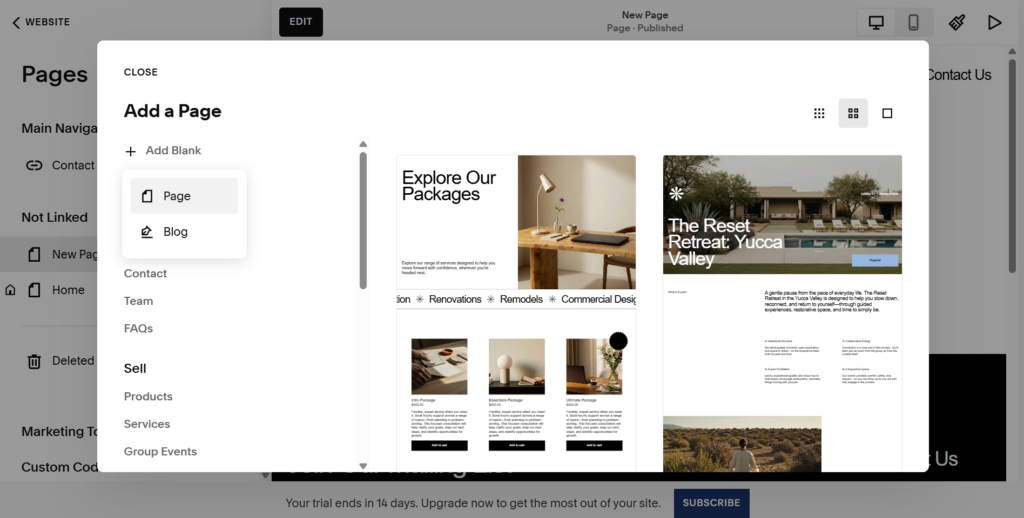
- Give it a clear, findable title, such as “Privacy policy” or “Privacy notice.”
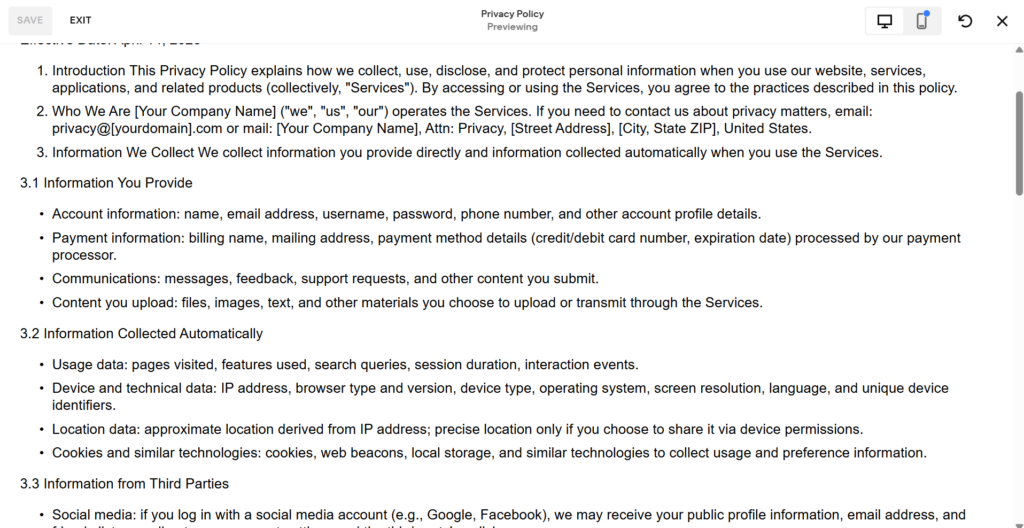
- Paste your policy content into the page, check that the formatting is clean, and publish it.
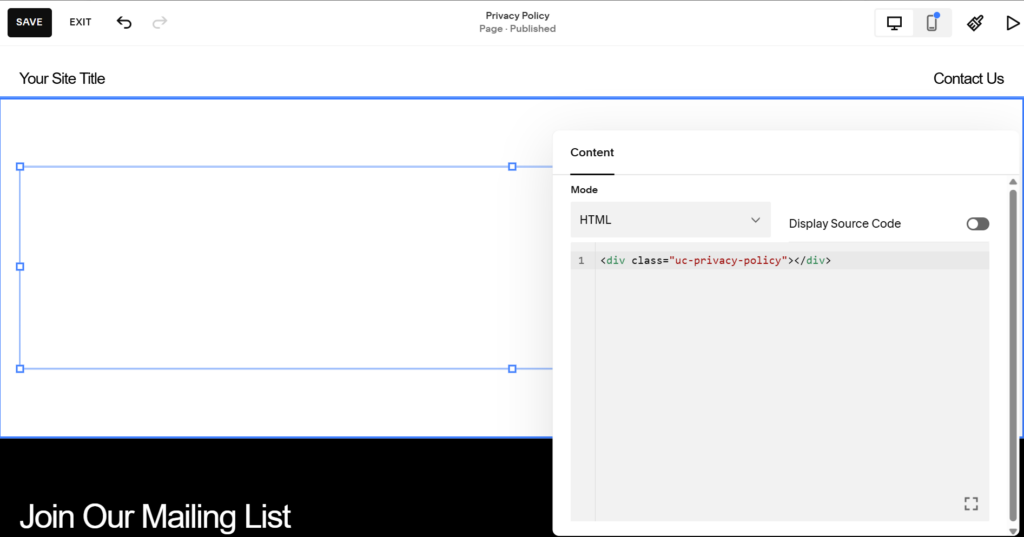
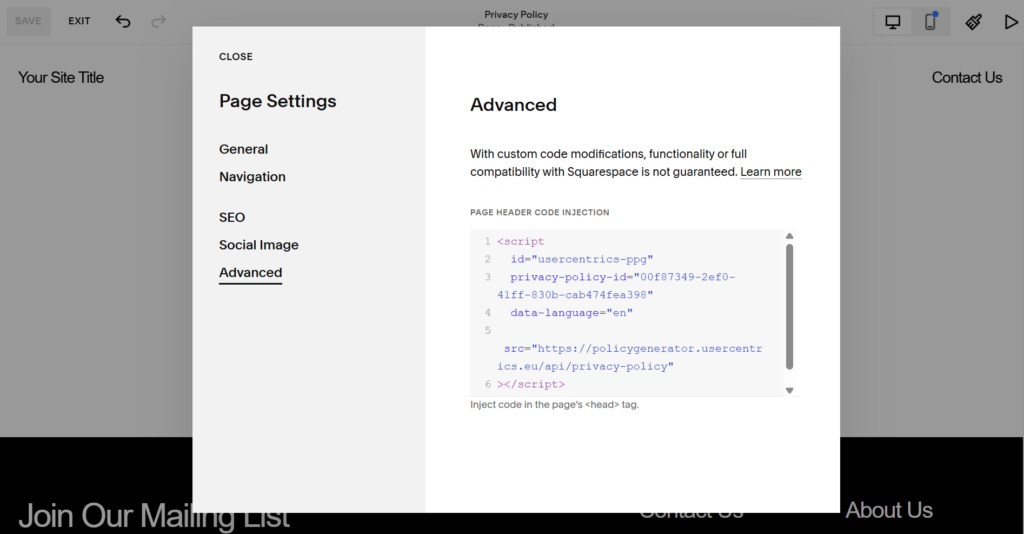
If you used the Usercentrics Privacy Policy Generator, paste the embed code into a Code block on the page. This keeps the policy up to date automatically. Any updates appear on your site without manual edits.
Once the page is live, make sure it’s not protected by a password or restricted to members only. Your privacy policy must be publicly accessible at all times.
Where to Display Your Privacy Policy on Squarespace?
Publishing the page is only part of the requirement. Regulations and privacy best practices require that visitors can easily find your policy, including before any personal data is collected.
Here are the most common places to add it.
Website Footer
The footer is typically the most important placement for your privacy policy.
To add your privacy policy to your Squarespace website footer, enter Edit mode on any page, scroll to the bottom, and click Edit Footer. Add a Text Block or Menu Block and link to your Privacy Policy page. This makes the link visible on every page of your site.
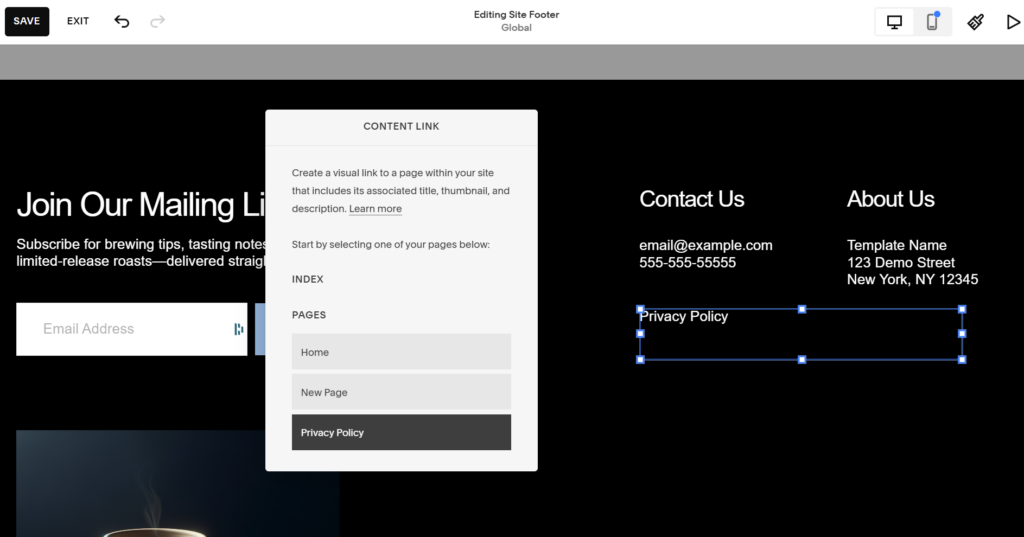
Use a clear label like “Privacy Policy” rather than something vague like “Legal.”
Cookie Banner
Your cookie banner is another key place to include the policy.
Go to Settings → Cookie and Visitor Data → Cookie Banner and link directly to your Privacy Policy page. Visitors making consent decisions should be able to read the full policy immediately, without having to search for it.
Contact and Sign-Up Forms
Contact forms and newsletter sign-up forms should reference your privacy policy near the submit button.
Within the Form Block settings, you can add a Disclaimer or a Checkbox field. A short note like, “By submitting this form, you agree to our Privacy Policy,” with a direct link to the page, is standard practice.
For Squarespace GDPR compliance, using a checkbox to ensure active, voluntary consent is required.
E-commerce Checkout
If you run an online store, include a link to your privacy policy during the checkout process.
Go to Commerce (or Settings) and select Checkout. Look for the Service Agreement section. Here, you can require customers to acknowledge your Privacy Policy and Terms of Service before completing a purchase.
Email Subscription Forms
Newsletter blocks benefit from the same transparency. In the Newsletter Block settings, use the Post-Submit or Disclaimer fields to include a link to your policy. This demonstrates transparency about how you store and use subscriber information from the moment they sign up.
Squarespace’s Built-In Cookie Tools: What They Cover (and What They Don’t)
Squarespace includes a set of privacy controls that give site owners a useful starting point, but they only cover Squarespace’s own tools and tracking.
By default, Squarespace enables you to add a basic cookie banner with a link to your privacy policy. You can enable opt-in mode, so Squarespace analytics cookies do not load until a visitor gives consent.
There’s also an option to disable the visitor activity log, which stops Squarespace from collecting IP addresses and similar backend data. If needed, you can turn Squarespace analytics cookies off completely.
These settings can help reduce the amount of data collected through Squarespace itself, but they do not cover third-party tools added to your site.
That is where the biggest compliance gaps appear. Scripts added through code injection, such as Google Analytics, Meta Pixel, or advertising tags, can still load before consent is given. Squarespace’s native banner also does not offer granular consent categories such as Analytics, Marketing, and Functional cookies.
It also doesn’t keep auditable consent records, and it does not support Google Consent Mode v2, which affects how Google Ads and Google Analytics behave when a visitor declines tracking.
Lastly, for sites that target visitors in the EU and use third-party tracking tools, Squarespace’s built-in banner is usually not enough for GDPR compliance. In those cases, you will generally need a dedicated consent management platform (CMP), such as Usercentrics Web CMP. A CMP can manage consent across all scripts on the site, not just Squarespace’s own tools.
How to Keep Your Squarespace Privacy Policy Up to Date?
A privacy policy is not something you publish once and forget. As your website evolves, so do the tools you use, the data you process, and the regulations that apply. Any of these changes can make an existing policy incomplete if it’s not reviewed regularly.
Therefore, aim to review your policy whenever you add a new third-party service, change how you collect or use personal data, or start serving visitors in regions with different legal requirements. Even without visible changes to your setup, an annual review is a sensible baseline.
If you generated your policy using the Usercentrics Privacy Policy Generator on a paid plan, updates driven by regulatory changes are applied automatically. This reduces ongoing maintenance, but doesn’t replace the need to update the policy when your own data practices change.
When you make significant updates, particularly ones that affect how visitor data is processed, consider notifying existing users and customers. Under the GDPR, material changes may require renewed consent from users whose data is affected.
Turn Your Squarespace Privacy Policy Into Action
A clear, accurate privacy policy for your Squarespace website shows visitors what happens to their data and why. It sets expectations, documents their rights, and records your responsibilities. For most site owners, getting this in place is a significant step toward compliance.
The next step is making sure your site’s behavior matches what the policy says. If you reference cookies, analytics tools, or marketing integrations, your Squarespace setup should reflect that with appropriate consent mechanisms in place. A policy without the right technical controls is incomplete.