Being a competitive enterprise today requires not only strong products and treating customers well, but also a privacy-responsible digital experience. As new global regulations are passed, existing ones evolve, and consumer expectations rise, cookie popups have become essential for transparent data practices and user trust.
A cookie popup is often the first interaction a visitor has with your brand. Done well, it builds confidence. Done poorly, it frustrates users, hinders consent rates, and risks privacy noncompliance.
In this guide, we break down the essentials of cookie popups, why they matter, how they work in practice, and how to implement them effectively, including step-by-step instructions for Usercentrics’ platform.
At a glance
- Cookie popups are an essential tool for privacy compliance (e.g., GDPR, CCPA) and building user trust through transparent data practices.
- A compliant cookie popup must offer clear information and meaningful choice, allowing users to accept, reject, or customize consent for non-essential cookies.
- Effective cookie popups integrate with a consent management platform (CMP) to automate scanning, manage consent logs, and support global and regional compliance needs.
- Failure to comply with regulatory requirements can result in significant regulatory fines, operational disruptions, and damage to brand reputation.
- Using a CMP is a reliable, scalable method for implementing a privacy-compliant cookie banner, especially for organizations operating across multiple jurisdictions.
What is a cookie popup?
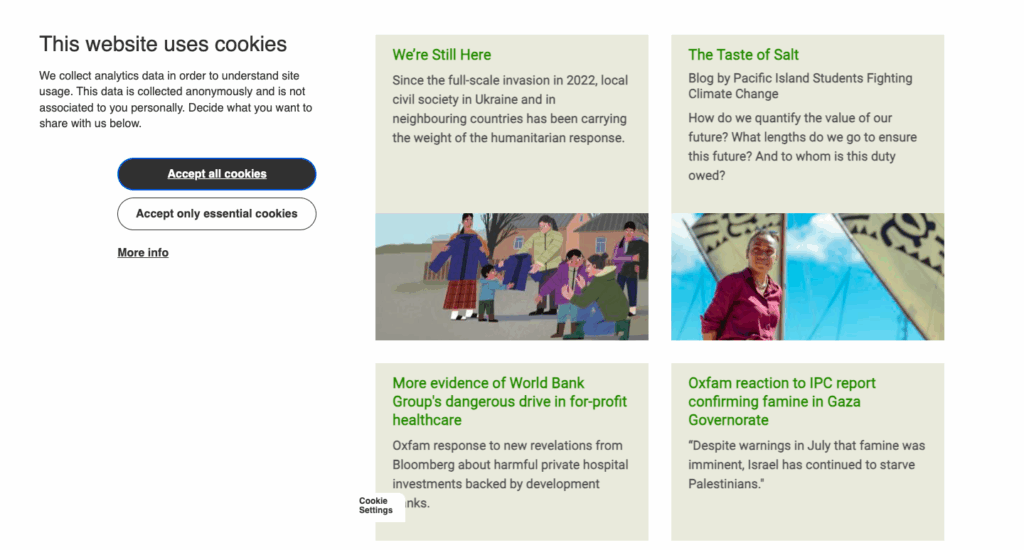
A cookie popup, also known as a cookie banner or consent banner, is a notification that appears on a digital property, like your company’s website, to inform visitors and users about the use of tracking cookies and other data-collecting technologies. It also presents a consent request for their permission to use them to collect individuals’ personal data.
These popups typically explain:
- Which cookies or tracking scripts are in use
- Why they’re used, e.g., analytics, ad personalization, marketing
- Who may receive the data, including third parties
- What choices users can make regarding consent depending on relevant regulations
For example, when landing on an e-commerce site, a popup may appear to explain that analytics cookies are in use to help improve product recommendations. The user can accept all, reject all, or choose only the categories they’re comfortable with.
Or on a news site, a popup displays details about advertising partners, how tracking affects paid content, and what rejecting consent means, e.g., seeing fewer personalized ads or needing to log in.
Under European rules and frameworks like the General Data Protection Regulation (GDPR) and ePrivacy Directive (also sometimes known as the “cookie law”), websites and apps must comply with more than just notification requirements.
When collecting users’ personal data, digital property owners have certain obligations regarding users’ data privacy, in addition to those regarding data use, as outlined above:
- Obtaining consent before data collection or or processing or enabling easy opt-out at any time
- Securely storing collected data and consent information
- Including clear and explicit consent choices
- Not disclosing or selling the data to third parties without prior consent from users (in many cases)
- Getting new consent if processing purposes change or laws require a refresh
Cookie popups are important for website owners, app publishers, and other connected platforms. But they’re also important to consumers whose data is being requested.
They let users know what technologies can collect their data, for what purposes, and enable individuals to make informed choices about access to their data, ideally that are granular and easily revocable.
A main reason to implement a cookie popup is to comply with global privacy laws, such as the GDPR and the California Consumer Privacy Act (CCPA). But user trust is also a driving force behind Privacy-Led Marketing and privacy-compliant practices.
A cookie popup enables:
- Transparency: Users understand what data is collected and why.
- Choice: Visitors gain meaningful control over their digital experience.
- Trust: Clear explanations and easy controls foster confidence and reduce friction.
- Privacy compliance: popups demonstrate alignment with global privacy laws, helping avoid regulatory penalties.
- Performance: Consent allows businesses to activate analytics and marketing tools responsibly, improving revenue and user engagement.
Cookie popups and data privacy laws
Cookie popups may not be explicitly referenced in regulatory texts, but they play a crucial role in companies’ compliance practices for data privacy laws across the globe. Many regulations, such as the GDPR, require websites to gather explicit consent from users before collecting, using, or sharing their data through cookies.
Other laws, like those in the U.S., usually only require users to be able to opt out at any time, though can require specific text be displayed and prior consent for sensitive data or children’s data.
Pretty much all data privacy laws require organizations to notify users about data access and use and their rights. To comply with global data privacy laws, website owners and app publishers must follow a few key requirements of cookie popup use.
Transparency
Cookie popups must clearly disclose the types of cookies and other tracking technologies in use, purposes of data collection, and third-party access to the data, among other potential requirements.
User control
Popups should provide users with granular control over their cookie preferences, enabling them to accept or reject different categories of cookies, e.g., functional, analytical, or marketing.
Informed consent
The information provided in the popup must be clear and easily understandable and avoid legal or technical jargon to ensure users can make informed decisions. Ideally, the popup will also have geotargeting functionality to display relevant regulatory information and enable display in users’ preferred languages.
Active consent
Where legally required (which is much of the world), websites and apps must obtain affirmative action from users indicating their agreement before placing non-essential cookies. Consent cannot be assumed, manipulated, or pre-set. Ideally the consent management platform will block non-essential cookies until consent is obtained.
Accessibility
Cookie popups should be designed to be user-friendly and accessible across different devices, including mobile, and for users with different abilities and browsing setups.
Policy links
The popup should include links to more detailed cookie or privacy policies for users who want additional information on data processing, their rights, and how to exercise them.
Regular updates
Cookie policies and popups should be regularly updated to reflect changes in tracking technologies present on a website, data processing practices, or new or updated regulations. Ideally the consent management platform will automate these updates to mitigate risk and save you time and resources.
International laws requiring cookie consent popups
Different regions approach consent in different ways. Below is a simplified overview:
- GDPR (EU): Requires explicit, informed consent for non-essential cookies.
- ePrivacy Directive (EU): Governs tracking technologies in electronic communications.
- UK GDPR (United Kingdom): Requires explicit, informed consent for non-essential cookies.
- CCPA/CPRA (California): Focuses on transparency and opt-out rights; popups commonly used to meet requirements. (Other U.S. state-level privacy laws use the same model.)
- Brazil’s Lei Geral de Proteção de Dados (LGPD): Requires transparency and lawful bases for processing, including consent.
- Canada’s Personal Information Protection and Electronic Documents Act (PIPEDA): Uses a hybrid model; may require express consent depending on sensitivity and context.
- South Africa’s Protection of Personal Information Act (POPIA): Requires lawful processing and clear user communication.
Many data privacy laws are designed to protect individuals — residents of the jurisdiction in which each law is in place. Many such laws are also extraterritorial, meaning it doesn’t matter where the organization is located that is processing data, as long as they are processing the data of residents of that jurisdiction.
This also means that organizations operating internationally may well need to comply with multiple regulations at the same time. A comprehensive CMP supports customized cookie popups and region-specific consent management.
The list above is not exhaustive, and it’s important for website owners and app publishers to be up to date on the jurisdictions and laws relevant to their business, and their compliance requirements. Companies should consult qualified legal counsel and/or a privacy expert.
Cookie consent popup best practices checklist
Creating an effective cookie popup requires both regulatory compliance and a user-friendly approach. Remember that users make decisions in seconds. Good design and clear information helps them understand the request and feel in control, which improves consent rates.
- Clear information: Explain which cookies you use, what kinds of data you collect, and for what purposes. Specify the types of cookies, e.g. necessary, functional, analytics, marketing. Mention if third-party cookies are used, and who sets them.
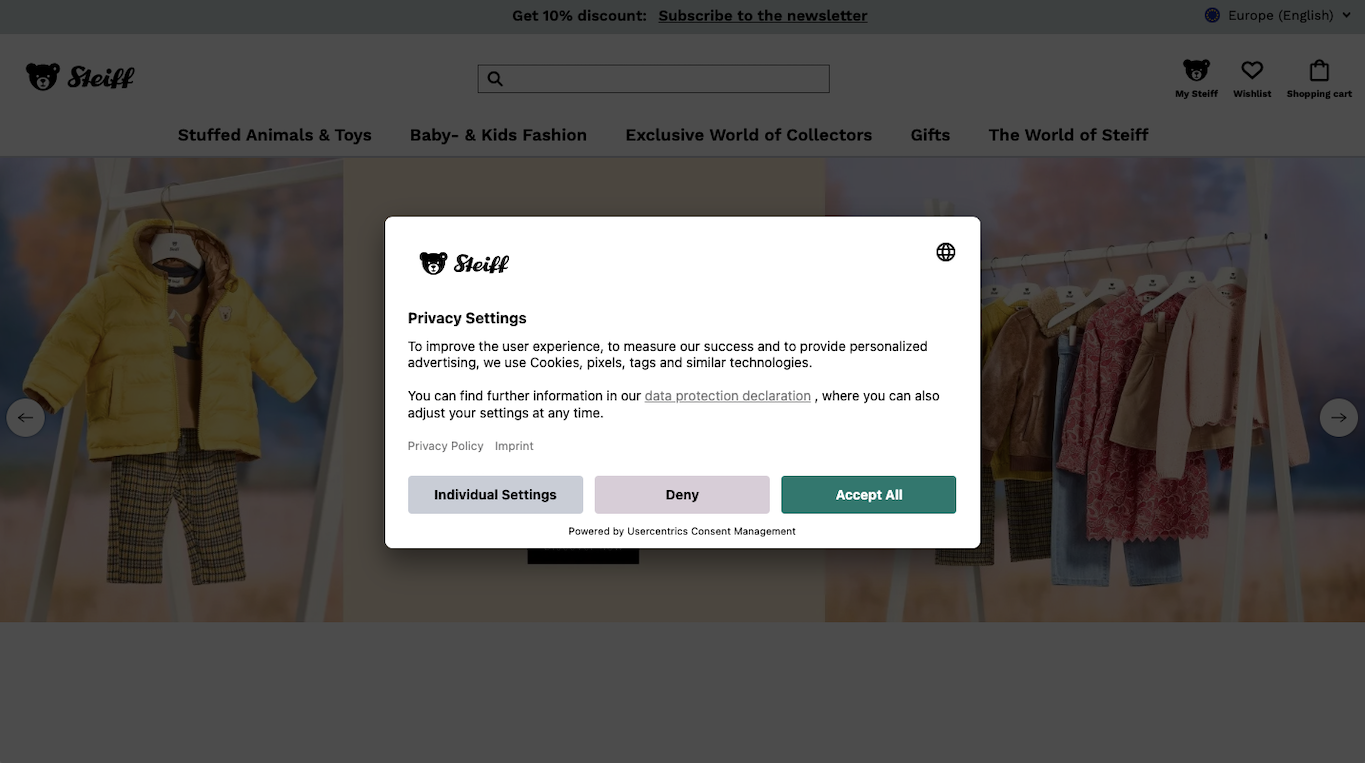
- Consent options: Provide equal consent options, like “Accept” and “Reject” buttons, for overall consent for cookie use, and ideally options for granular consent, a function often placed on the CMP’s second layer. Do not use manipulative dark patterns, like prechecking boxes or hiding the “Reject” option.
- Active consent collection: Require users to take a clear affirmative action that’s recorded, e.g., clicking a button. Do not use scrolling or continued browsing as consent, which is prohibited under many laws.
- Consent signaling: Ensure that users’ consent preferences can be signaled to your full marketing stack, including ads and analytics providers. A comprehensive CMP will be integrated with tools like Google Consent Mode, Microsoft UET Consent Mode, and Microsoft Clarity Consent Mode to enable this signaling. An additional benefit is that modeling and insights from anonymized data can still be obtained if users do not provide consent.
- Enable easy consent withdrawal: Provide a method for users to easily change their preferences or withdraw consent. Include a persistent “cookie widget” or callback button to make it easy to access. If consent is withdrawn, cease data collection and processing right away.
- Timely consent collection: Obtain consent before setting any non-essential cookies in jurisdictions where this is required. Best practice would be to block cookies automatically until consent is obtained. A robust CMP can enable this blocking.
- Consent storage: Securely store user consents for as long as needed for privacy compliance and other legal requirements. Include who consented, what they agreed to, what information they were shown, and the time and date of consent. Ensure updates over time are included. Be ready to provide information in the event of an inquiry by data protection authorities or a data subject access request (DSAR).
- Provide access to more information: Include a link to your full cookie policy or privacy policy that is easily accessible from web pages or app screens. Ensure it’s kept up to date and display the last date of update (and ideally a link to the previous version).
- Visibility and accessibility: Ensure the popup is prominently displayed and easily noticeable. Make it accessible on all devices and platforms, but also branded and user-friendly to use. Don’t use it to block user access to websites or apps unless users consent.
- Language and readability: Use clear language without technical or legal jargon. Provide the banner in all languages your website supports, ideally with automatic geotargeting.
- Respect user choices: Implement technical measures to honor user preferences. Block non-essential cookies until consent is given, where required. If users decline consent, don’t ask again before the legally allowed period of time — often 12 months, though laws vary. If your data processing purposes change, however, you may be legally required to get new consent.
By following this checklist, you can create a compliant cookie consent popup that respects user privacy and provides a good user experience.
How do you add a cookie popup to a website?
There are multiple ways to install a cookie popup on your website, which vary in the amount of manual work, platform suitability, and potential risk.
The most reliable method is to use a consent management platform like Usercentrics CMP. A CMP automates privacy compliance, improves user experience, and drastically reduces the setup and maintenance effort to maintain compliance as regulations evolve.
Below are the main implementation options, followed by a dedicated guide for implementing using Usercentrics.
1. Use a Consent Management Platform (CMP)
- Automatically scans your website for cookies and tracking technologies
- Categorizes them and generates a full cookie declaration
- Blocks non-essential scripts until consent is given
- Stores consent logs securely
- Supports geotargeting, multiple languages, branding, and customization
- Integrates with consent mode tools to maintain analytics and advertising performance
This is the most scalable approach for enterprises or teams working across multiple markets. However, it also benefits smaller teams, as setup and maintenance are user-friendly and don’t require a lot of technical intervention.
2. Use a WordPress plugin
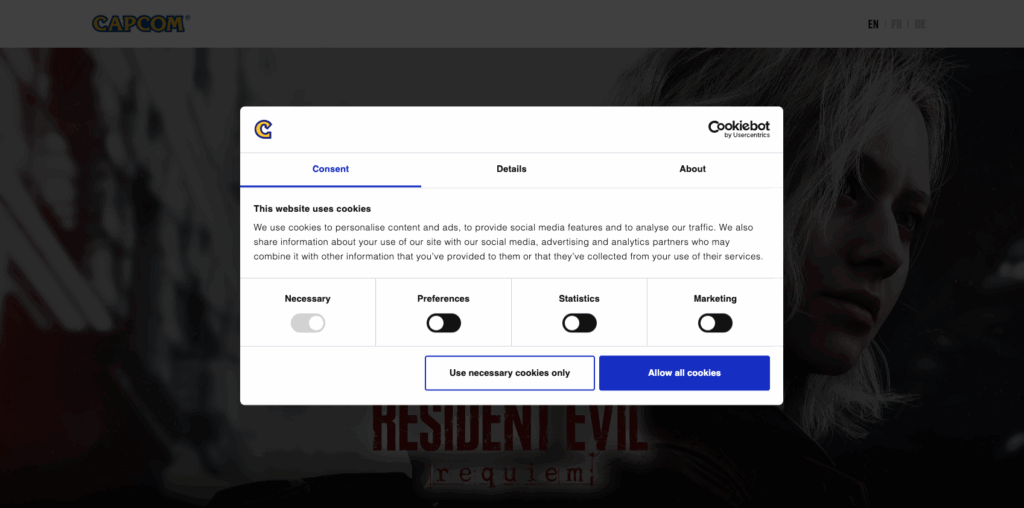
For WordPress sites, you can install a cookie consent plugin specifically for that platform. The Usercentrics Cookiebot WordPress Plugin streamlines this process for peace of mind. This tool provides:
- Automatic scanning
- Pre-built banner templates
- Easy configuration without coding
3. Code a cookie popup manually
While it is possible, it’s becoming increasingly complex to build and maintain a DIY cookie popup that meets evolving regulatory requirements and user expectations. A cookie popup for consent that’s built in-house requires:
- Custom logic to block cookies until consent is obtained, or opt-out functionality to halt processing
- A consent logging system
- Legal review
- Ongoing maintenance as regulations, technologies in use, and business operations update
For most businesses, this quickly becomes costly and too risky. If your site only uses essential cookies and does not collect any personal data, it’s possible to display an information-only cookie popup, but this type of site is rare.
Additionally, as companies grow, consent management requirements become more complex across web properties and the marketing ecosystem, and a DIY consent solution is unlikely to scale sufficiently.
Setting up your cookie popup with popular CMS platforms
Usercentrics simplifies setting up a privacy-compliant cookie banner on your website. If you use a popular Content Management System (CMS), you can easily integrate our solution. We provide detailed, step-by-step guides for the most common platforms:
- Set up a Shopify cookie banner: Integrate a Shopify cookie banner to keep your online store privacy-compliant while maintaining a seamless shopping experience.
- Set up a Wix cookie banner: Set up a Wix cookie banner that matches your site design and provides full control over consent preferences.
- Set up a HubSpot cookie banner: Implement a HubSpot cookie banner to manage tracking and marketing cookies directly within your CRM ecosystem.
- Set up a Webflow cookie banner: Add a Webflow cookie banner that helps to ensure privacy compliance while preserving your brand’s visual style.
Each guide provides clear instructions on installation, customization, and compliance best practices. This information helps you align your banner’s design and consent journey with both user expectations and the necessary regulatory standards.

How to implement a Usercentrics cookie popup (step-by-step guide)
Below is a simplified implementation flow, which will apply to most implementations.
1. Create your Usercentrics account
Sign up at: https://usercentrics.com (14-day free trial). Verify your account and log into the Admin Interface.
2. Start configuring your cookie popup
From the Configuration section in the Admin Interface, add your configuration details, including domain, i.e., your website or e-commerce store where the popup will be displayed, language preferences, etc.
3. Set up initial site scan
From the Service Settings section in the Admin Interface, initiate the first scan of your site by clicking the Initial Website Scan button to detect all of the Data Processing Services (DPS), i.e., the cookies and trackers you’re using on your site.
Once the scan is completed, it will generate your scan report, which will show up under DPS Overview.
4. Categorize Data Processing Services
The CMP will automatically categorize your DPS in use. Marketing, Functional, and Essential cookies are included by default. You can manually edit anything that comes up as unclassified under Service Categories. You can also make other edits to existing classifications there. Use our predefined categories or your own.
5. Add the Data Processing Services
Using the list from your initial scan report and the Add Service button to the right of each DPS listing, add all of the relevant cookies and trackers in use on your website. These will be added to the CMP, and users will be able to access and control their cookie consent in a granular way by category.
Note that scripts for the DPS need to be adjusted to enable blocking until consent is obtained. The DPS list will also be available to populate your Cookie Declaration.
6. Customize the cookie popup’s appearance
In the Appearance section, under Styling, customize your consent banner, including the colors, logos, fonts, and other brand styling.
Under the Layout section you can customize the popup’s first and second layer settings. For example, the granular DPS information and consent options are often included on the second layer. The Privacy Trigger can also be configured under Layout. This is the shortcut or link icon that enables users to revisit their consent choices and update them.
7. Customize the cookie popup’s content
Under the Content section you can customize the text, links, and other related elements that users will see. Usercentrics CMP supports over 60 languages. You can also customize legally required texts here, like the “Do Not Sell Or Share My Personal Information” link required by the CCPA for California-based visitors.

8. Implement your cookie popup
Copy the CMP Script Tag from the Implementation section and add it to the head section of your website. If you use Google Tag Manager, add the Usercentrics template tag before other tags. For additional implementation methods, check our guides.
9. Publish and monitor interactions and consent rates
In the Analytics section of the Admin Interface, the dashboard will display:
- Consent rates
- Regional differences
- Technology detection changes
- Logs for audit purposes
Use the reports to monitor your opt-in rates and to identify opportunities to optimize your cookie popup configuration.
Consequences for a noncompliant cookie popup
Cookie popups are no longer just a formality; they are a necessity. If your cookie consent popup does not provide the relevant information and consent choices to your website visitors, app users, e-commerce customers, and others, you can face hefty fines, operational disruptions, loss of customer trust and brand reputation, and a long-term hit to revenue.
Some of the enforcement measures under global privacy laws include:
- Under the GDPR, fines can be up to EUR 20 million or 4 percent of a company’s global annual revenue, whichever is higher.
- The California Privacy Protection Agency (CPPA) can impose fines of up to USD 7,500 per violation. It’s adjusted based on the consumer price index, and has gone up to nearly USD 8,000 per violation. In California, individuals can also sue companies for damages from a data breach.
- In Canada, organizations can be fined up to CAD 100,000 per violation, and cases are resolved in federal court. The Privacy Commissioner can also require an organization to enter into a compliance agreement to prevent violations or to rectify proven ones.
- Under Switzerland’s FADP, fines can be levied against private individuals, not just companies.
- In the United Kingdom, the Information Commissioner’s Office (ICO) can impose fines of up to GBP 17.5 million or 4 percent of a company’s global annual revenue, whichever is higher.
- In South Africa and a few other countries, violations can result in prison sentences of up to 10 years for certain offenses.
Data privacy violations commonly stem from:
- Collecting data without proper consent
- Failing to offer meaningful and equal consent choices
- Retaining data after the processing purpose has completed
- Not obtaining valid parental consent for access to children’s data
- Using manipulative or otherwise noncompliant interfaces
- Not updating banners to reflect new processing activities
How a Consent Management Platform (CMP) can help
A consent management platform provides tools to help you achieve and maintain compliance with data privacy laws such as the GDPR and CCPA.
Also importantly, it helps protect your business and your brand, demonstrating to customers, partners, investors, and regulatory authorities that you prioritize privacy and data protection.
95 percent of consumers won’t buy from a company that doesn’t protect their data, which makes privacy compliance critical for sustainable growth, and a serious competitive differentiator. The Return on Trust (RoT) is undeniable.
A robust CMP like Usercentrics’, with a customized and privacy-compliant cookie popup, also saves your organization time and resources. It provides powerful tools to automate scanning and updates and to optimize consent rates. Usercentrics is also a Gold Tier Google-certified CMP Partner, so consent management integration with your Google tools is seamless.
Usercentrics does not provide legal advice, and information is provided for educational purposes only. We always recommend engaging qualified legal counsel or privacy specialists regarding data privacy and protection issues and operations.

Join our growing community of data privacy enthusiasts now. Subscribe to the Usercentrics newsletter and get the latest updates right in your inbox.