

Mastering GA4 cross-domain tracking strategy and setup
Managing multiple domains doesn’t have to mean losing sight of the customer journey. In this guide we’ll show you how to track visitors seamlessly across domains while building a privacy-first analytics setup.

Learn how cross-domain tracking works to make your data more accurate, how to set up cross-domain tracking in Google Analytics 4 (GA4), and some common pitfalls to look out for.
Key takeaways
- Cross-domain tracking in GA4 stitches user activity across multiple domains into a single session, preventing inflated user counts, broken attribution, and fragmented customer journeys.
- Google Tag Manager (GTM) is the most efficient way to configure GA4 cross-domain tracking, ensuring identifiers are passed reliably between domains for accurate reporting.
- Setup requires alignment: domains must be listed consistently in both GA4 and GTM, with allowLinker enabled, and tested through DebugView or Tag Assistant to avoid data gaps.
- Common pitfalls include missing domains, adding unnecessary subdomains, misconfigured linker parameters, and failing to integrate with consent management for privacy compliance.
- Alternatives like Segment, Adobe Analytics, and Matomo also support multi-domain tracking, but GA4 + GTM remains the most widely adopted, especially when paired with server-side tagging.
- Server-side tagging is the future, offering improved accuracy, privacy compliance, and resilience against browser restrictions: helping businesses prepare for the cookieless future with reliable, privacy-first analytics.
- What is cross-domain tracking?
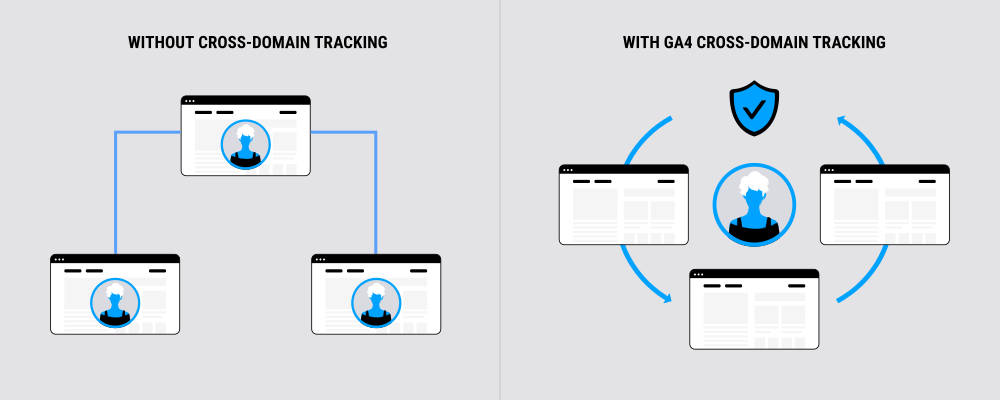
Cross-domain tracking is used by Google Analytics and other tools to recognize the same user as they move among different domains. Instead of treating each domain visit as a separate session, cross-domain tracking stitches those interactions together to create a single, accurate view of the user journey.
For example, if a user starts on your marketing site, clicks through to your product site, and then completes a purchase on your checkout site, cross-domain tracking will tie all of those interactions to one visitor.
Without cross-domain tracking, analytics tools pick up these transitions as three new sessions. This results in broken attribution, inflated user counts, and misleading performance data.
Implementing GA4 cross-domain tracking solves the problem of multiple domains disrupting your analytics. It gives you smoother attribution, more reliable metrics, and a complete understanding of how customers are interacting with your digital ecosystem.
Why cross-domain tracking is important for user journeys
If your customer journey spans more than one domain, cross-domain tracking is essential for gathering data you can trust.
These days, customer journeys rarely take place on a single domain. A visitor might discover your brand on a campaign microsite, browse your main website for details, and then complete their purchase on a separate checkout domain.
While this is one continuous experience, analytics platforms without cross-domain tracking in place would interpret it as multiple unrelated sessions from different users.
This disconnect creates several problems:
- Lost attribution: Conversions appear to come from “direct traffic” instead of the real source
- Inflated numbers: The same person is counted as multiple unique users
- Fragmented journeys: It’s harder to understand how channels and touchpoints are truly influencing customer behavior
That’s why cross domain visitor identification is crucial. This tracking code means analytics tools recognize the same person across all domains, and ties together their interactions into one single, accurate user profile.
With multi-domain tracking in place, you can:
- See the customer’s full path, from first click to conversion
- Make smarter decisions about budget allocation and campaign performance
- Build trust in your data for both marketing and business stakeholders
Essentially, you get cleaner attribution and a fuller view of how users move among your websites.
Go deeper into attribution models, unassigned traffic in GA4, and how to validate your data for smarter decisions: Guide to marketing measurement
Cross-domain tracking with Google Tag Manager
One of the best ways to implement cross-domain tracking in GA4 is through Google Tag Manager (GTM). By configuring your GA4 tags correctly, GTM passes client identifiers among domains, helping to ensure that the same visitor is recognized across all sites.
This process is often referred to as Google Tag Manager cross domain tracking or simply GTM cross-domain tracking.
When you configure GTM correctly, people moving among your websites will be tracked across one continuous user journey. Just make sure the list of domains in GA4 matches the list in GTM. Mismatches are one of the most common reasons cross-domain tracking fails.
What is cross-domain tracking in Google Analytics 4?
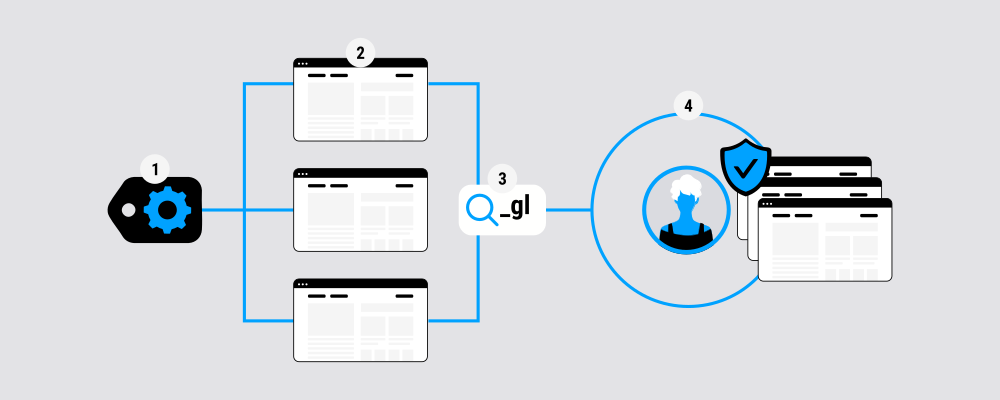
In GA4, cross-domain tracking works by carrying a visitor’s unique identifier from one domain to another. When someone clicks a link that directs them between your sites, GA4 adds a small piece of tracking code (_gl) to the URL. The second domain reads that and recognizes the visitor as the same person, rather than creating a new session ID.
GA4 makes this process much simpler than it was in Universal Analytics. Instead of editing code manually, you just enter the list of domains you want to connect in your GA4 settings. GA4 then takes care of passing the identifier and stitching session information together automatically.
This means you get consistent, accurate data across all of your domains, and a full view of the real customer journey from start to finish.
When do you need to use cross-domain tracking in Google Analytics 4?
Not every website setup requires cross-domain tracking. But if your business relies on multiple domains, it’s the best way to get accurate reporting in GA4.
When you need GA4 cross-domain tracking
- Your checkout is hosted separately
- e.g. your main site is brand.com, but the payment process runs on checkout.com
- You run marketing or campaign microsites
- visitors start on campaign.com and then move to brand.com to convert
- Your product or blog is on a different domain
- e.g. blog.brand.com or productsite.com that links back to your primary site
- You have different product sites
- e.g. software-brand.com and hardware-brand.com
- You use regional or language-specific domains
- e.g. brand.co.uk and brand.de
When you don’t need GA4 cross-domain tracking
- You use subdomains
- e.g. blog.brand.com and shop.brand.com count as the same domain in GA4 by default
- You use subdirectories
- e.g. brand.com/blog or brand.com/shop always count as the same domain
In these cases, GA4 automatically tracks the journey as a single session, so no special setup is required.
How does cross-domain tracking work in Google Analytics 4?
In GA4, cross-domain tracking works by transferring a visitor’s unique user identity among domains so their activity is stitched into one session ID. The key to this process is the linker parameter.
Here’s what happens in the background:
- A visitor clicks a link from one of your domains (e.g. brand.com) to another (e.g. checkout.com).
- GA4 automatically appends the _gl linker parameter to the URL. This URL parameter contains the visitor’s client ID (and, if enabled, user ID.)
- The second domain reads the parameter and applies the same client ID to that visitor.
- Google Analytics recognizes them as the same user and continues the original session ID, instead of starting a new one.
- This automatic stitching means you don’t need custom coding. As long as the correct domains are listed in your GA4 property settings, GA4 will handle the passing of identifiers in the background.
How to set up cross-domain tracking in Google Analytics 4
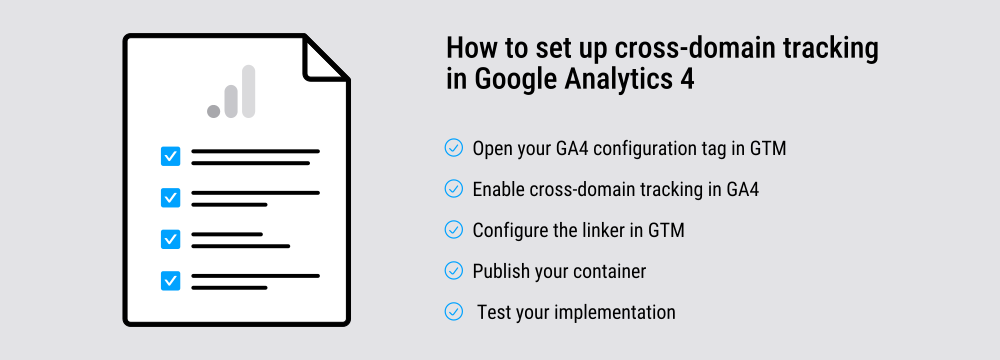
Here we’ll walk you through the steps to set up cross-domain tracking in GA4. Everyone will have some variance in web properties, but the steps are clear enough to adapt to your needs.
1. Open your GA4 configuration tag in GTM
- Navigate to your GA4 configuration tag.
- Under Fields to Set, check that allowLinker is enabled. This enables GTM to append tracking parameters to URLs.
2. Enable cross-domain tracking in GA4
- In your GA4 property settings, go toAdmin → Data Streams → More Tagging Settings → Configure your domains.
- Add all relevant domains you want to track, e.g. example.com, checkout.com, blog.example.com.
3. Configure the linker in GTM
- While still in your GA4 configuration tag, expand Cross Domain Tracking.
- Add the same domains you listed in GA4.
- GTM will automatically append the _gl linker parameter to URLs when users click among these domains.
4. Publish your container
- Save your changes.
- Preview to test.
- Publish your container.
5. Test your implementation
- Use GA4 DebugView or Tag Assistant to confirm that sessions persist when you navigate among domains.
- Check that no new session is created when crossing from one domain to another.
Common mistakes and how to fix them
Cross-domain tracking can easily break down due to small oversights. Here are some common issues and how to resolve them.
Forgetting to configure all domains
Mistake: Only adding domains in GA4 or only in GTM.
Fix: Make sure the same list of domains is present in both the GA4 property settings and your GA4 configuration tag in GTM. A mismatch means sessions won’t stitch correctly.

Adding unnecessary subdomains
Mistake: Including subdomains, e.g. blog.brand.com, in the cross-domain list.
Fix: GA4 already tracks subdomains under the same property. Only add separate root domains, e.g. brand.com and checkout.com.

Ignoring consent and privacy requirements
Mistake: Deploying cross-domain tracking without integrating it with your consent management platform (CMP).
Fix: Always ensure that GA4 tags only fire once valid user consent is given where required by relevant data privacy laws.

Broken linker parameters
Mistake: The _gl parameter isn’t being added to URLs. This usually happens if allowLinker is disabled or if links are hard-coded without GTM’s tracking logic.
Fix: Double-check your GA4 configuration tag. In GTM, ensure allowLinker is enabled and the cross-domain list is correctly set.

Not testing properly
Mistake: Publishing changes without validation. Errors often go unnoticed until reports show inflated users or unexplained “direct” traffic.
Fix: Use the Google Analytics Debugger (GA4 DebugView) and Tag Assistant to test across all domains before publishing. Simulate real user journeys, like moving from blog to website to checkout, to confirm sessions persist.

Alternative tools: Segment and other solutions
While most businesses rely on GA4 and GTM for cross-domain tracking, they’re not the only options available. Other analytics and tag management tools offer similar functionality, though the setup and flexibility can vary.
Segment cross-domain tracking
Segment, a popular customer data platform, provides its own way of stitching together user activity across domains. Instead of relying on linker parameters, Segment uses a centralized tracking script that captures events and user IDs.
These are then passed into downstream tools, like Google Analytics 4 , Mixpanel, or CRM systems. This makes it easy to manage cross-domain visitor identification across your entire analytics and marketing stack.
Other multi-domain tracking tools
Adobe Analytics: Uses its Experience Cloud ID Service to unify visitors across domains
Matomo: Supports cross-domain tracking through URL parameters and configuration settings
Other CDPs: Platforms like RudderStack and Tealium provide similar capabilities to Segment
Why Google Analytics 4 and Google Tag Manager are popular
Even with alternatives available, Google Analytics 4 with Google Tag Manager remains the most common setup. It’s free, widely supported, and integrates directly with Google Ads and other Google products.
The main limitation is complexity. As your tracking needs grow, GTM setups can become difficult to maintain, especially across multiple domains and compliance requirements.
That’s why many teams look to server-side tagging (SST) as a way to simplify management, improve data accuracy, and stay privacy-first.
Server-side tagging: the future of cross-domain tracking
Cross-domain tracking with GA4 and GTM works really well, but it comes with some challenges. For example the setup can be complex, ongoing maintenance is often overlooked, and data privacy regulations add extra layers of risk.
As regulations tighten and browser restrictions expand, client-side cross-domain tracking will only get harder to maintain. Server-side tagging offers a way to simplify setups, provide data integrity, and stay privacy-compliant while keeping a high level of confidence in the analytics your teams rely on.
How server-side tagging works
Instead of sending data directly from the browser to every analytics or ad platform, SST routes requests through a secure server you control:
- Data is collected and processed centrally
- You control how information is processed, e.g. enriched or anonymized, and what information is forwarded, and to which platforms
- Consent choices are applied before any data leaves your environment
Benefits for cross-domain tracking
The value of server-side tagging extends well beyond simpler cross-domain setups. There are five major benefits that make the shift especially useful for marketers.
- Improved data accuracy with fewer gaps caused by ad blockers or browser restrictions
- Faster site performance, since tracking scripts move off the browser and onto your server
- Streamlined privacy compliance, thanks to centralized control over what data is collected and shared
- Simpler management: one central setup instead of juggling multiple GTM containers
Future-proof: More resilient to browser restrictions, ad blockers, and third-party cookie deprecation than Google Analytics and other off-prem tools.
Learn more about these benefits of server-side tracking: 5 key benefits of server-side tracking.
Preparing for the cookieless future
Cross-domain tracking is only part of the bigger shift shaping digital measurement. As browsers phase out third-party cookies and privacy regulations tighten, marketers need strategies that preserve measurement accuracy while keeping data privacy-first.
Tools like server-side tagging help bridge the gap, but they work best as part of a broader strategy. Google is already rolling out several cookieless solutions and privacy tools, including Consent Mode, Enhanced Conversions, and the Privacy Sandbox. These tools are designed to maintain reliable insights even as traditional tracking methods disappear.
Learn how these tools fit together, and how they can support your cross-domain tracking setup: Key Google tools providing cookieless solutions
For a broader perspective on what the cookieless future means for your business, and the solutions available to prepare for it, don’t miss our guide on how to prepare your marketing strategies for a cookieless future. This practical resource can help you to adapt before these changes hit your reporting.
Looking ahead: the future of data in marketing
Cross-domain tracking and server-side tagging are essential steps toward building a resilient, privacy-first analytics setup, but they’re just part of a much bigger shift.
As data privacy regulations tighten, tracking technology continues to advance, and consumer expectations around privacy increase, it’s important that marketers adapt with smarter data strategies that balance compliance, measurement, and growth.
For more information about these predicted changes, our guide The Future of Data in Marketing offers a deeper dive into how first-party data, innovative tools like Google Topics and Protected Audience APIs, and privacy-led frameworks are reshaping the way marketers connect with audiences without compromising trust.